 Ben •
Ben •
You've been here. The repo has a CLAUDE.md that's pushing 300 lines. There's an AGENTS.md that's mostly a copy of the CLAUDE.md someone added when the team adopted Cursor. There's a MEMORY.md that Claude Code auto-generated and nobody has opened since. There's a .cursorrules file from last quarter. There might be a copilot-instructions.md that someone added the week Copilot had its moment.
None of these files are wrong to have. The problem isn't the quantity - it's that they're being treated as a flat list of "AI config" when they're actually four distinct layers solving four distinct problems. When you put the wrong content in the wrong layer, every layer starts to fail. CLAUDE.md grows because it's absorbing content that belongs in three other places. MEMORY.md gets ignored because nobody understands what it's actually for. Subagents and skills never get built because the distinction between "rule" and "reusable capability" was never clear.
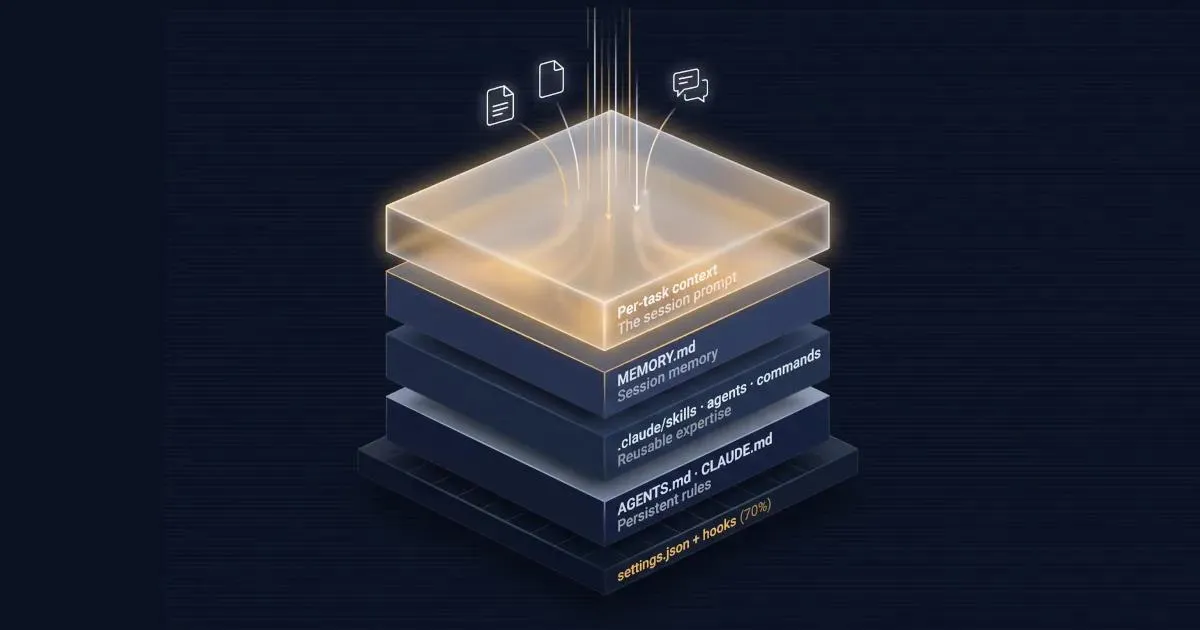
This post introduces a 4-layer framework for the full file ecosystem: persistent rules, reusable expertise, session memory, and per-task context. By the end, you have a decision table you can actually use. If your repo doesn't even have its first rules file yet, start with our breakdown of AGENTS.md vs CLAUDE.md . If you're ready to organize the full stack, keep reading.
┌─────────────────────────────────────────────────────┐
│  LAYER 4 - Per-task context                         │
│  The session prompt (not a file)                    │
│  What's specific to this one task                   │
├─────────────────────────────────────────────────────┤
│  LAYER 3 - Session memory                           │
│  MEMORY.md                                          │
│  What the agent learned and logged this session     │
├─────────────────────────────────────────────────────┤
│  LAYER 2 - Reusable expertise                       │
│  .claude/skills/  .claude/agents/  .claude/commands/│
│  Capabilities built once, invoked many times        │
├─────────────────────────────────────────────────────┤
│  LAYER 1 - Persistent rules                         │
│  AGENTS.md  CLAUDE.md                               │
│  Project law - true day 1 and day 200               │
└─────────────────────────────────────────────────────┘
         Below the stack: settings.json + hooks
         (deterministic enforcement - not instructional)
Layer 1 - Persistent rules (AGENTS.md, CLAUDE.md): The things that are unconditionally true about this project. Code conventions. Build commands. Security constraints. Repository structure. These files should read like engineering law, not session notes. If something stops being true when the sprint changes, it doesn't belong here.
Layer 2 - Reusable expertise (SKILL.md files under .claude/skills/, subagents under .claude/agents/, slash commands under .claude/commands/): Pre-built capabilities the agent can invoke. The code-review checklist it runs on every PR. The security-review subagent that loads a fresh context window. The /debug-trace command that walks through a stack trace in a defined way. Built once. Reused across hundreds of sessions. This is a different problem from "what are the rules of this project."
Layer 3 - Session memory (MEMORY.md): What the agent itself logged during an autonomous work session. Not a config file you maintain - a log file the agent maintains. It records decisions made, approaches tried, state established. You consult it; the agent updates it. Treating it like a config file is one of the most common misuses of the format.
Layer 4 - Per-task context (the session prompt): The Notion PRD for the feature you're building tonight. The customer support thread you're debugging. The design doc for the migration. This context is specific to one task, not one project. It doesn't belong in any of the repo-layer files - it belongs in the session prompt, assembled before the task begins. This is the layer every existing guide leaves out.
Below the stack sits settings.json and hooks - the deterministic enforcement layer. These don't instruct the model; they constrain it. More on that later.
These files are your project's standing instructions. They define how the AI behaves in this codebase on every session, from the first to the five hundredth.
The choice between AGENTS.md and CLAUDE.md is primarily a tool-scope question: CLAUDE.md is read by Claude Code specifically (and other Claude-based tools that implement the convention), while AGENTS.md is an emerging cross-tool standard - it's been adopted across over 60,000 public repositories and is governed under the Linux Foundation's Agentic AI Foundation. If you're on a Claude Code team and have no other tools in the picture, CLAUDE.md is fine. If your repo is being used by developers with different AI coding tools, AGENTS.md makes your rules portable. For the full breakdown of when to use which, see the AGENTS.md vs CLAUDE.md decision .
What belongs here: code conventions enforced project-wide, build and test commands, security constraints ("never commit credentials," "all API calls go through the service layer"), architectural rules ("this service doesn't call the database directly"), the repository structure overview that orients a new session.
What stays true about this layer: the content should survive a sprint change. If it'll be outdated by next Friday, it's not persistent-rules content.
This is where the layer confusion does the most damage. According to HumanLayer's analysis of Claude Code's system prompt , Claude Code already ships ~50 instructions in its system prompt, and frontier models operate effectively with roughly 150 total instructions before attention dilution sets in. Every line you put in CLAUDE.md competes with those. As noted in our Claude Code token usage breakdown , if your CLAUDE.md is over 200 lines, you're paying for it - in tokens on every request and in degraded instruction-following on the instructions that matter.
Here are six categories that routinely end up in CLAUDE.md and belong somewhere else:
1. Code style and formatting rules Prettier config, ESLint rules, naming conventions, import order - none of this belongs in CLAUDE.md. A linter enforces these deterministically and doesn't consume instruction budget. If your code style is defined only in CLAUDE.md, you're asking a probabilistic system to do a deterministic job. Put it in .eslintrc, .prettierrc, or equivalent. Reference those files in CLAUDE.md if you want the model to know they exist, but the rules themselves live in the tooling.
2. Per-feature or per-sprint implementation notes "We're currently migrating auth from JWT to session cookies" or "the payment module is being refactored - don't touch OrderService until merged" are time-bounded. They're not project law. They belong in the session prompt for the sessions where they're relevant, or in MEMORY.md if the agent is maintaining state across a long-running task. Putting them in CLAUDE.md means they linger after the migration is done and silently mislead future sessions.
3. Credentials, tokens, and environment-specific values This one feels obvious but appears constantly in repos. API keys, staging URLs, environment-specific feature flags - none of these belong in a committed markdown file the model reads. They belong in environment variables, a .env file excluded from version control, or a secrets manager. If you need the model to know where to find credentials, tell it the environment variable name, not the value.
4. Behavioral rules that settings.json can enforce deterministically "Always ask before deleting files" and "don't make network calls" sound like CLAUDE.md content. They're not - they're enforcement rules. settings.json lets you specify allow, ask, and deny permission rules for specific tools and patterns. A rule in settings.json is enforced by the harness. A rule in CLAUDE.md is a polite request to a probabilistic model. Put enforcement where it can actually enforce.
5. Session-specific debugging context "We've tried X and Y, the issue is in the connection pool" is not project law - it's session state. It belongs in MEMORY.md (if the agent is maintaining it) or in a scratch file referenced in the current session prompt. Committing it to CLAUDE.md means every future session starts with stale debugging context from a problem that was probably solved weeks ago.
6. Tutorial-style documentation for the codebase "Here's how the authentication flow works, step by step" isn't a rule - it's documentation. It belongs in docs/, where it can be maintained, versioned, and linked to. If you want the model to read it, reference the file path in CLAUDE.md and use a skill or slash command to load it when needed. Embedding documentation in CLAUDE.md makes both worse: the rule file gets bloated, and the documentation gets frozen.
Layer 2 is where you put capabilities - things the agent can do, as distinct from rules about how it should behave. The difference is functional: a persistent rule says "don't merge without tests." A reusable capability says "here's exactly how to run the security review."
Layer 2 lives under .claude/ in three subdirectories:
.claude/
├── agents/          # Subagents - isolated context for delegated work
├── commands/        # Slash commands - reusable workflows
└── skills/ # Skills - auto-loaded expertise modulesA skill is a SKILL.md file living under .claude/skills/<skill-name>/. According to Anthropic's skills documentation , skills extend Claude's capabilities through YAML frontmatter that defines the skill's description (used for automatic discovery) plus optional behavior controls, and a markdown body with the instructions Claude follows when the skill runs. The skill's description is always visible in Claude's context; the full body loads only when the skill is invoked - either by you typing /skill-name or by Claude deciding the skill is relevant to your request.
This on-demand loading is what separates a skill from dropping the same checklist into CLAUDE.md. The checklist only costs tokens when you're actually doing a code review.
Here's a minimal code-review skill following Anthropic's documented format:
.claude/skills/code-review/
├── SKILL.md
└── checklist.md
---
description: Systematic code review against this project's quality standards. Use when asked to review a PR, diff, or specific file, or for pre-merge checks.
when_to_use: Triggers on "review", "PR review", "check this code", or requests for pre-merge quality gates.
allowed-tools: Bash(npm run lint) Read Grep
---
## Code Review
When invoked, run the steps below and structure feedback as: Critical (must fix),
Warnings (should fix), Suggestions (consider improving).
1. Read checklist.md for the review criteria
2. Run `npm run lint` on the target files
3. Structure findings by priority with file:line references and specific fix suggestions<!-- .claude/skills/code-review/checklist.md -->
## Code Review Checklist
**Correctness**
- [ ] Logic matches the stated intent in the PR description
- [ ] Edge cases handled (null inputs, empty arrays, boundary values)
- [ ] Error handling is explicit, not swallowed
**Tests**
- [ ] New behavior has test coverage
- [ ] Existing tests still pass
- [ ] Tests cover failure cases, not just happy paths
**Security**
- [ ] No credentials or tokens in code
- [ ] User input is validated before use
- [ ] No new external dependencies without review
**Style**
- [ ] Follows project conventions (defer to .eslintrc for specifics)
- [ ] Function and variable names are descriptive
- [ ] Complex logic has inline commentsNote that allowed-tools in skills uses the same permission rule syntax as settings.json - Bash(npm run lint) pre-approves that specific command without requiring confirmation at invocation time, while Read and Grep are allowed broadly. Supporting files like checklist.md live in the skill directory and are referenced from SKILL.md; Claude loads them on demand rather than at session start.
A subagent is a separate agent instance with its own system prompt, invoked by the main agent to handle a specific task. They live under .claude/agents/ as individual markdown files with YAML frontmatter. The key property: a subagent gets a fresh context window. It doesn't inherit the conversation history of the parent session.
That isolation is the reason to use one. When you're in the middle of a large coding session - 40,000 tokens of conversation history - and you need a thorough security review, launching a subagent means that review runs without the accumulated context of your entire session weighing on it.
According to Anthropic's Claude Code documentation and the shanraisshan/claude-code-best-practice reference repo, subagents are well-suited to: security reviews, large-scale refactoring passes, test generation for existing code, and documentation generation - all high-context tasks that benefit from a clean starting point.
Here's a minimal security review subagent using Anthropic's documented frontmatter format:
---
name: security-review
description: Focused security review for code changes. Use for pre-merge security checks. Reads source files only - does not modify them or make network calls.
tools: Read, Grep, Glob, Bash(npm run *), Bash(git diff *)
model: sonnet
---

You are a security reviewer. When invoked:
1. Read the files or diff passed as context
2. Review for: input validation gaps, auth/authz issues, exposed credentials,
   SQL/command injection risks, unsafe deserialization
3. Return findings as a structured list: finding, severity (critical/high/medium/low),
   file:line, and recommended fix. If no findings, state that explicitly.

If a finding depends on context you don't have (e.g., upstream validation),
flag it as "conditional" rather than assert it as a vulnerability.
The tools field is an allowlist - the subagent can only use the listed tools. This is the correct way to scope subagent permissions in Claude Code: enumerate exactly what it needs. This matters beyond tidiness. A subagent with access to WebFetch or Write becomes a prompt injection surface: malicious content inside a file under review can instruct the subagent to exfiltrate environment variables loaded in the main session context, or overwrite files the parent agent trusts. Scoping the tools list to read-only operations severs that path entirely. Without a tools field, a subagent inherits all tools from the parent session - which is almost never what you want for a security reviewer.
Slash commands live under .claude/commands/. According to the current Claude Code documentation, custom commands have been unified with skills - a file at .claude/commands/review.md and a skill at .claude/skills/review/SKILL.md both create /review and work identically. Your existing .claude/commands/ files keep working; skills just add optional features like the directory structure for supporting files.
The rule of thumb: if you do something more than once a day, make it a command. Three worth building in almost any engineering repo:
---
description: Run a code review on the specified file or diff.
disable-model-invocation: true
allowed-tools: Bash(npm run lint) Read Grep
---

Run a code review on: $ARGUMENTS

Invoke the code-review skill. Focus on: correctness, test coverage, security.
Structure feedback as: Critical, Warnings, Suggestions.
Save as .claude/commands/review.md
---
description: Walk through a stack trace or error message systematically.
disable-model-invocation: true
---

Debug the following error: $ARGUMENTS

1. Identify the error type and originating line
2. Trace the call stack upward to find the root cause
3. Check recent changes in those files: `git log --oneline -10 -- <file>`
4. Propose two hypotheses before suggesting a fix
Save as .claude/commands/debug-trace.md
---
description: Reload project context at the start of a new session.
disable-model-invocation: true
---

Reload project context:
1. Read CLAUDE.md (or AGENTS.md if present)
2. Read MEMORY.md if it exists - summarize what was in progress
3. Run the build command and report status
4. List files modified in the last 3 commits: `git log --oneline -3 --name-only`
Save as .claude/commands/context-refresh.md
The /context-refresh command operationalizes the session-startup ritual most developers do manually. Building it as a command makes it consistent and ensures nothing gets missed.
MEMORY.md is the most consistently misunderstood file in this ecosystem. Two things practitioners get wrong about it:
Misconception 1: "It's a config file I maintain." It's not. MEMORY.md is a file the agent maintains. Claude Code and similar tools are built to update it automatically during long-running tasks - recording decisions made, approaches tried, state established. You read it to understand where the agent left off. You don't typically write to it manually.
Misconception 2: "It replaces the session prompt." It doesn't, for the same reason an engineering log doesn't replace a task brief. MEMORY.md tells you what happened previously. The session prompt tells you what you're doing now. These are complementary, not interchangeable.
Anthropic's writing on effective harnesses for long-running agents describes a pattern they call claude-progress.txt - a plain-text file the agent writes to as it works, logging what it's done and what state it's in. MEMORY.md formalizes that pattern. The purpose is continuity across interrupted sessions: the agent can read its own log and resume without reconstructing state from conversation history.
What MEMORY.md is for:
What MEMORY.md is not for:
One practical implication: if you're reading MEMORY.md at the start of a session and finding it full of stale entries from six months ago, that's a signal the agent was running without guidance on when to prune. Adding a MEMORY.md maintenance note to your CLAUDE.md (e.g., "archive MEMORY.md entries older than 2 sprints to docs/agent-log/") is a legitimate Layer 1 rule.
This is the layer every existing guide omits, and it's the layer where most practical context engineering actually happens. For the broader picture on context engineering as a discipline, see the Anthropic context engineering field manual .
Here's the problem. You're working on a feature tonight. You have:
None of that belongs in CLAUDE.md. It's not project law - it'll be irrelevant by next sprint. None of it belongs in a skill - it's not a reusable capability. None of it belongs in MEMORY.md - the agent hasn't seen it yet. It belongs in the session prompt, assembled before you start.
This is the source of CLAUDE.md bloat in most teams. Practitioners sense that the model needs this context and, having no other mechanism, stuff it into CLAUDE.md. The file grows. Instruction budget shrinks. Genuinely persistent rules get diluted by time-bound notes. And the per-task context doesn't even work well there - it's loaded on every session, not just the one where it's relevant.
The right pattern: the session prompt for tonight's work includes the Notion PRD, the relevant file excerpts, and the prompt fragments specific to this task. Tomorrow's session starts clean.
This is what HiveTrail Mesh is built for: assembling that Layer 4 payload from Notion docs, local files, and saved prompt snippets - with a token counter so you know what you're spending and a privacy scanner that runs before anything leaves the machine. The repo-layer files (Layers 1–3) handle what's permanent. Mesh handles what's specific to today.
Below the four layers sits settings.json. This isn't part of the instructional stack - it's the enforcement layer. The difference is functional: a rule in CLAUDE.md asks the model to behave a certain way. A rule in settings.json makes the tool behave that way, regardless of what the model would prefer.
Here's a representative .claude/settings.json for a TypeScript service, using the actual schema from Anthropic's settings documentation :
{
  "$schema": "https://json.schemastore.org/claude-code-settings.json",
  "model": "claude-sonnet-4-6",
  "permissions": {
    "allow": [
      "Bash(npm run lint)",
      "Bash(npm run test *)",
      "Bash(git diff *)",
      "Bash(git log *)"
    ],
    "ask": [
      "Bash(git push *)"
    ],
    "deny": [
      "WebFetch",
      "Read(./.env)",
      "Read(./.env.*)",
      "Read(./secrets/**)"
    ]
  },
  "hooks": {
    "PreToolUse": [
      {
        "matcher": "Write|Edit",
        "hooks": [
          {
            "type": "command",
            "command": "npm run lint --silent"
          }
        ]
      }
    ]
  }
}
A few things worth making explicit:
Permissions belong in settings.json, not CLAUDE.md. "Don't make network calls" is a security rule. Putting it in CLAUDE.md makes it a suggestion. Adding "WebFetch" to the deny array makes it a hard constraint - the tool call never executes. If the boundary matters, enforce it deterministically.
Permission rules use tool-specific syntax, not category names. The format is Tool or Tool(specifier). Bash(npm run lint) allows that specific command. Bash(npm run *) allows any npm run command. Read(./.env) denies reading that specific file. This granularity lets you allow npm run lint while still blocking npm run deploy - something CLAUDE.md cannot do.
Hooks fire at the tool level, not the instruction level. A PreToolUse hook with matcher "Write|Edit" runs your lint script before every file write or edit, unconditionally. No amount of context or clever prompting skips it. Hook events include PreToolUse, PostToolUse, SessionStart, SessionEnd, and others - see Anthropic's hooks documentation for the full event list.
"Ask" is for reversible-but-consequential actions. git push has external consequences that are hard to undo, so it goes in ask rather than allow or deny. Claude Code will prompt for confirmation before executing it.
The practical heuristic: if the rule could be expressed as a boolean (allow/deny) or a trigger (run this script on this action), it belongs in settings.json. If it requires judgment (e.g., "write idiomatic TypeScript, not Java-style TypeScript"), it belongs in CLAUDE.md.
Most repos today are used by developers with different AI coding tool preferences. The question isn't "which one file do I create" - it's "how do I structure this for a mixed team."
Three patterns, based on how many tools you're supporting:
Single tool → one file Claude Code only: use CLAUDE.md. Cursor only: use .cursorrules. GitHub Copilot only: use .github/copilot-instructions.md. Each tool's native file format, nothing else.
Two tools → AGENTS.md as the primary, tool-specific file as an extension The common case: Claude Code + Cursor, or Claude Code + Copilot. The 60,000+ repo adoption of AGENTS.md reflects this becoming standard practice. Create AGENTS.md with everything that applies to all tools. Create CLAUDE.md with Claude Code-specific additions (skills references, subagent notes, Claude-specific behaviors). For Cursor, have .cursorrules import AGENTS.md directly:
# .cursorrules - thin wrapper that imports your canonical rules file
@AGENTS.md

# Add any Cursor-specific overrides below this line
Three or more tools → quad-file pattern with AGENTS.md as the canonical source When you're supporting Claude Code, Cursor, Copilot, and potentially others:
AGENTS.md                          # Canonical - all tools, all rules
CLAUDE.md                          # Claude Code-specific (skills, subagents, hooks)
.cursorrules                       # Cursor-specific (thin, @AGENTS.md import)
.github/copilot-instructions.md    # Copilot-specific (thin, references AGENTS.md)
The discipline here: AGENTS.md is the source of truth. Tool-specific files add tool-specific behavior; they don't duplicate general rules. If you find yourself maintaining the same rule in three files, you have a process problem, not a file problem. Use a script to generate the tool-specific files from AGENTS.md during CI if the duplication is unavoidable.
The cross-tool decision tree:
Does your team use only one AI coding tool?
├── Yes → Use that tool's native file. Done.
└── No → Use AGENTS.md as your primary file.
    Does the project use Claude Code?
    ├── Yes → Add CLAUDE.md for Claude-specific extensions.
    └── No → AGENTS.md alone may be sufficient.
    Does the project use Cursor?
    ├── Yes → Add .cursorrules (@AGENTS.md import + Cursor-specific additions).
    └── No → skip.
    Does the project use GitHub Copilot?
    ├── Yes → Add .github/copilot-instructions.md (references AGENTS.md).
└── No → skip.This is the table to bookmark. Fourteen content types, each mapped to the layer and file where they belong, with the reason.
| Content type | Layer | File / Location | Why |
|---|---|---|---|
| Code style and formatting rules | - | .eslintrc, .prettierrc, linter config | Deterministic enforcement; not a model concern |
| Build and test commands | Layer 1 | AGENTS.md / CLAUDE.md | True on every session; tool-agnostic in AGENTS.md |
| Security constraints (intent) | Layer 1 | AGENTS.md / CLAUDE.md | Architectural rule - persistent |
| Security constraints (enforcement) | Below stack | settings.json permissions.deny | Harness-enforced; not a model request |
| Architectural rules ("don't call DB directly") | Layer 1 | AGENTS.md / CLAUDE.md | Project law - persistent |
| Repository structure overview | Layer 1 | CLAUDE.md (or AGENTS.md) | Orients every session; tool-specific detail in CLAUDE.md |
| Code review process | Layer 2 | .claude/skills/code-review/SKILL.md | Reusable capability; description in context, full body loads on demand |
| Security review | Layer 2 | .claude/agents/security-review.md | Needs fresh context window; scoped tool access |
| Repeated workflows (PR review, debug trace) | Layer 2 | .claude/commands/*.md | Invoked by the developer; not always needed |
| Pre-approve specific tool calls | Below stack | settings.json permissions.allow | Harness-level; not instruction-level |
| Decisions made during current autonomous task | Layer 3 | MEMORY.md | Agent-maintained; session continuity |
| Current sprint goals or in-flight migrations | Layer 4 | Session prompt (assembled before task) | Changes sprint-to-sprint; not project law |
| The Notion PRD for tonight's feature | Layer 4 | Session prompt | Task-specific; irrelevant to other sessions |
| Credentials and API keys | - | Environment variables / secrets manager | Never in a model-readable file |
These four layers handle the context that's persistent, reusable, and session-level. What they don't handle - what none of them are designed to handle - is the context specific to today's task: the PRD, the relevant thread, the design doc for this feature.
That's the layer we built HiveTrail Mesh for: assembling the Notion docs, local files, and prompt fragments specific to the current task, with a token counter and a privacy scanner that runs before anything leaves your machine. The repo-layer files solve persistent context. Stop stuffing tomorrow's context into today's CLAUDE.md. The Mesh beta is open - join here .
On this page
CLAUDE.md is a configuration file you write and maintain - it defines the persistent rules and context for the project. MEMORY.md is a log file the agent maintains - it records what happened during autonomous sessions: decisions made, state reached, progress on long-running tasks. You write CLAUDE.md; the agent writes MEMORY.md. You read MEMORY.md; the model reads CLAUDE.md at the start of every session. They solve different problems at different layers of the stack.
Skills in Claude Code are defined as SKILL.md files stored under .claude/skills/<skill-name>/. Each skill has a frontmatter description field that stays in the model's context so Claude knows when to invoke it, and a markdown body with the actual instructions, which only loads when the skill runs. A code-review skill, for example, keeps just its trigger conditions in the main context; the full review checklist loads only when you ask for a code review. This keeps the baseline context window lean while making complex capabilities available on demand.
Use a subagent when the task is high-context and benefits from a fresh context window isolated from the current session's history. Security reviews, large-scale refactors, test generation for a legacy module - these are tasks where accumulated conversation history is noise, not signal. A CLAUDE.md instruction is a persistent rule for every session. A subagent is a specialist invoked for a specific job, with scoped tool access you define explicitly in its frontmatter.
Code style rules (use a linter), per-feature or per-sprint implementation notes (use the session prompt), credentials and tokens (use environment variables), behavioral rules the harness can enforce (use settings.json permission rules), session-specific debugging context (use MEMORY.md), and tutorial-style documentation (use docs/). The practical test: if it'll be stale by next sprint, it doesn't belong in CLAUDE.md.
No. Code style belongs in your linter configuration - ESLint, Prettier, Stylelint, whatever your stack uses. A linter enforces style deterministically, runs in CI, and doesn't consume the model's instruction budget. Putting style rules in CLAUDE.md asks a probabilistic system to do a job a deterministic tool handles better. Reference your linter config in CLAUDE.md if you want the model to know it exists, but keep the rules in the tool.
CLAUDE.md gives instructions to the model - it shapes how the model reasons and responds. settings.json configures the tool - it controls what actions Claude Code will and won't take, regardless of what the model wants to do. Permissions, hook scripts, model selection: these are settings.json concerns. Code conventions, architectural rules, project context: these are CLAUDE.md concerns. The practical rule: anything you'd enforce in CI or with a linter belongs in settings.json or tooling, not in a markdown file the model reads.
Use AGENTS.md as the canonical file with rules that apply to all tools. Create tool-specific files for extensions: CLAUDE.md for Claude Code-specific behavior (skills, subagents, hooks references), .cursorrules for Cursor (import @AGENTS.md and add Cursor-specific rules below), and .github/copilot-instructions.md for Copilot. The discipline: general project rules live in AGENTS.md only. Tool-specific files extend, not duplicate. If you're maintaining the same rule in three files, something has gone wrong.

AGENTS.md is the emerging open standard for AI coding agents. Here's how it compares to CLAUDE.md, when to use each, and how to run both without drift.
Read more about AGENTS.md vs CLAUDE.md: The AI Developer's Guide to Context Standards
Long-running AI agents lose context over time. The fix isn't bigger context windows. It's a curated handoff between coding sessions. Here's the protocol.
Read more about Why Long-Running AI Agents Forget: A Session Context Strategy
Reduce Claude Code token usage with 9 high-leverage tactics. Learn how to prune CLAUDE.md, optimize the autocompact buffer, and cut context costs in half.
Read more about Claude Code Token Usage: Cut Context Costs in Half