 Ben •
Ben •
If you're burning through Claude Code context faster than expected, the root cause is almost always one of five structural problems: a bloated CLAUDE.md, MCP servers injecting tools you're not using, missing subagent delegation for verbose work, /compact and /clear used at the wrong moments, or simply not running /context until you're already in trouble. This post covers nine tactics, ordered by leverage, with specific token numbers from real sessions. They're not independent hacks - they compound. Fix tactics 1–3 and you'll cut your baseline overhead by 20,000–30,000 tokens before writing a single line of code.
You can't optimize what you can't measure. Before touching CLAUDE.md or disconnecting MCP servers, run /context in your session.
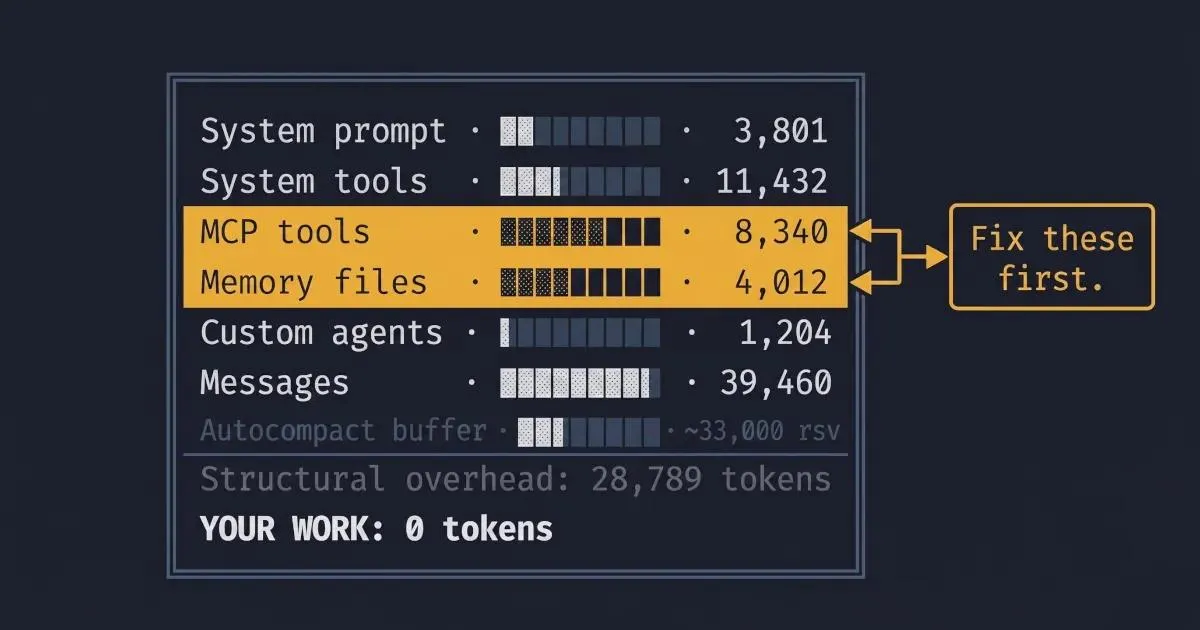
The command returns a structured breakdown: system prompt, system tools, MCP tools, memory files (where CLAUDE.md lives), custom agents, messages, free space, and the autocompact buffer. Here's what that actually looks like - this is from Damian Galarza's documented Claude Code session , with a 101K/200K token load:
╔══════════════════════════════════════════════════════════════╗
║              Context Window Usage: 101,249 / 200,000         ║
╠══════════════════════════════════════════════════════════════╣
║ System Prompt          ░░░░░░░░░░░░░░░░░░░░░░  3,801 tokens  ║
║ System Tools           ████░░░░░░░░░░░░░░░░░░ 11,432 tokens  ║
║ MCP Tools              ███░░░░░░░░░░░░░░░░░░░  8,340 tokens  ║
║ Memory Files           ██░░░░░░░░░░░░░░░░░░░░  4,012 tokens  ║
║ Custom Agents          █░░░░░░░░░░░░░░░░░░░░░  1,204 tokens  ║
║ Messages               ████████████░░░░░░░░░░ 39,460 tokens  ║
║ Free Space             ████████░░░░░░░░░░░░░░ 32,000 tokens  ║
║ Autocompact Buffer     ████░░░░░░░░░░░░░░░░░░ [~33,000 rsv]  ║
╚══════════════════════════════════════════════════════════════╝
What to read from this output: Before any work has happened, this session is already at 28,789 tokens of structural overhead (system prompt + tools + memory + agents). That's the tax you pay on every single request. If your own /context output shows 50K+ before you've typed anything, you have structural problems - and tactics 1 and 2 below are your fix.
In Claude Desktop, you don't need a command: the context window indicator at the top of your session is clickable and opens the same breakdown panel. Use it.
One important note on the autocompact buffer: Most posts you'll find still reference the old ~45,000-token buffer. That changed in early 2026 with v2.1.21 , which fixed "auto-compact triggering too early on models with large output token limits" and reduced the reserved buffer to approximately 33,000 tokens. That's ~12K more usable space than you had in 2025. If a blog post still cites 45K, it's stale.
Practical rule: Run /context at the start of every non-trivial session. If your baseline is above 30K before typing anything, fix the structure before starting work. Session optimization mid-task is fighting symptoms; tactic 1 treats the cause.
What it is: CLAUDE.md gets injected into every single request. Every token in that file is a token taxed on every interaction, before you've typed a word.
The numbers: Damian Galarza's CLAUDE.md shows at 4,012 tokens in the /context breakdown above - roughly 2% of the window, which is reasonable. I've seen CLAUDE.md files bloat to 8K tokens and beyond. HumanLayer's research on CLAUDE.md structure frames it as an instruction budget: frontier thinking models can reliably follow ~150–200 instructions. Beyond that, you're paying tokens for instructions that don't reliably fire.
The action:
Keep your root CLAUDE.md under 2,000 tokens. Point to other files by reference; Claude will read them on demand when the task requires them. The lean/bloated contrast looks like this:
# Bloated (8K tokens - avoid this)
## Project overview
This is a full-stack TypeScript application using Next.js 14, React 18,
Tailwind CSS, Prisma ORM with PostgreSQL, and deployed on Vercel. The
application handles user authentication via Auth.js, manages a product
catalog with 47 separate entity types, processes payments through
Stripe, and integrates with three third-party APIs...
[... 200 more lines of context Claude doesn't need on most requests ...]

## Code standards
Always use TypeScript strict mode. Never use `any`. Always add JSDoc
comments to exported functions. Always use named exports. Prefer
functional components. Use React Query for server state. Use Zustand
for client state. Always add error boundaries. Use zod for
runtime validation...
[... 80 more lines of standards ...]
# Lean (under 1,500 tokens - do this instead)
## Quick reference
Stack: Next.js 14, TypeScript strict, Prisma/Postgres, Vercel
Auth: Auth.js. Payments: Stripe.
Detailed architecture → docs/ARCHITECTURE.md
Code standards → docs/STANDARDS.md
## Current work context
Feature: [update this per session]
Active branch: [update this per session]When to use this: Once, as a structural fix. If /context shows memory files over 3,000 tokens, start here.
For a full treatment of what belongs in CLAUDE.md, see the deeper reason sessions degrade - that post covers the content strategy, not just the size discipline. the AGENTS.md comparison covers more on this.
What it is: Every MCP server you connect injects its full tool definitions into the context window. Those definitions are loaded at session start and are present on every request, whether you use them or not.
The numbers: In the session above, MCP tools account for 8,340 tokens. That's from a relatively controlled configuration. Damian Galarza's post documents the specifics: mcp__memory__* tools clock in at 600–700 tokens each, multiply by 9 tools, and you have ~6K tokens of memory-server overhead alone. The playwright-mcp is more striking: 22 tools consuming ~14,300 tokens just by being available, regardless of whether you run a single browser test that session.
The action:
# In your Claude Code session, check what MCP servers are loaded
/context  # Look at the MCP Tools line

# Disable a server you don't need for the current session
# (In Claude Desktop: Settings → MCP → toggle off)
# (In claude_desktop_config.json: remove the server entry for the session)
Disable MCP servers you aren't actively using in a given session. Re-enable on demand. If you're doing backend API work, playwright-mcp doesn't need to be running. If you're not querying memory, the memory server doesn't need to be running.
When to use this: If /context shows MCP tools above 5K tokens and you're not actively using every connected server. This is a per-session discipline, not a one-time fix - the right server config for a browser automation session is different from the right config for a code review.
What it is: Subagents run in their own separate context windows. Only their final summary returns to your main conversation thread.
Best for: Large file reads, test run output, log file processing, research across many files - anything where Claude needs to consume a lot of input to produce a compact output. Instead of dumping a 15,000-line log into your main context, a subagent processes it and returns: "37 ERROR entries, all from the payment service, spanning 14:22–14:31 UTC. Most likely cause: rate limit from Stripe."
The critical caveat, from Anthropic's Claude Code cost docs : Agent teams use approximately 7x more tokens than standard sessions, because each agent maintains its own full context window. Subagents save tokens in your main context but cost more in total API spend.
Use subagents strategically: for specific high-cost operations where the alternative is injecting large volumes of raw data into your main session. Don't use them reflexively for every task - for short, scoped work, the overhead isn't worth it. The net win is in your main context's coherence; the gross token cost is higher.
When to use this: When the input the task requires (logs, test output, large files) would consume more tokens in your main context than the subagent overhead. The crossover point is roughly when the raw input exceeds 3,000–5,000 tokens.
What it is: Two commands that both reduce context, with meaningfully different outcomes.
/compact - summarizes conversation history and replaces the raw transcript with a compressed version. History is gone, but a summary remains. You can continue the same task./clear - completely wipes conversation history. No summary. Start fresh.The common mistake, documented in Habib Mohammed's post on token management : running /compact reactively, after Claude starts degrading. This is backwards. A healthy session produces a better, more accurate summary than a degraded one. If you compact late, you're compressing noise, not signal.
The rule: Run /compact at distinct phase boundaries - after finishing a feature, after completing a refactor, after closing a PR review - not when you notice quality dropping. If you've already noticed quality dropping, you've waited too long.
You can guide what /compact preserves:
/compact "Keep the API design decisions and the database schema"This tells Claude what to prioritize in the summary, which matters when some decisions are load-bearing for the next phase.
Use /clear when switching to genuinely unrelated work. Don't carry the context of a three-hour debugging session into a fresh feature implementation.
When to use this: /compact at every major phase boundary, proactively. /clear when the task context is genuinely done.
What it is: Claude Code triggers automatic compaction at approximately 83.5% of the total context window. With the current ~33K buffer reserved, this fires at roughly 167K tokens on a standard 200K window. You can override it with an environment variable.
The action:
# Trigger compaction earlier (70% of window - more aggressive, fewer surprises)
export CLAUDE_AUTOCOMPACT_PCT_OVERRIDE=70

# Trigger compaction later (90% of window - more usable space, higher risk)
export CLAUDE_AUTOCOMPACT_PCT_OVERRIDE=90
The earlier setting (70) is useful for heavy sessions with a complex state. It means more frequent compaction, but each summary is produced from a healthier context. The later setting (90) gives you more runway but risks the autocompact circuit breaker: three consecutive auto-compact failures trigger a manual intervention requirement , which is a worse interruption than an earlier automatic compact.
When to use this: Most developers shouldn't change the default. The default 83.5% threshold is well-calibrated for typical usage. This knob matters for two specific cases: (a) long, stateful sessions where late-session degradation is a recurring problem (lower the threshold), or (b) sessions where you're deliberately managing context manually and the autocompact is firing before you want it to (raise it, but watch for the circuit breaker).
What it is: Claude Code supports on-the-fly model switching via /model. The three models have meaningfully different cost profiles and capability ceilings.
The numbers, from Anthropic's pricing :
| Model | Input (per M tokens) | Output (per M tokens) |
|---|---|---|
| Haiku | lowest | lowest |
| Sonnet | $3 | $15 |
| Opus | $15 | $75 |
Opus costs 5x more than Sonnet per token. That cost differential is justified for complex multi-file reasoning, architecture decisions, and tasks requiring deep synthesis. It is not justified for "rename this variable" or "add a JSDoc comment."
The action:
# Switch model mid-session
/model sonnet   # Most daily work
/model opus     # Complex reasoning, multi-file changes
/model haiku    # Simple lookups, repetitive tasks

# Disable extended thinking for tasks that don't need it
/effort low

# Or cap thinking tokens via environment variable
export MAX_THINKING_TOKENS=8000
One useful pattern: use Opus for planning a complex task, then switch to Sonnet for implementation. Reasoning quality where it matters, implementation cost where it doesn't.
For extended thinking specifically: the DISABLE_NON_ESSENTIAL_MODEL_CALLS environment variable cuts out certain background model calls that don't affect primary task output:
export DISABLE_NON_ESSENTIAL_MODEL_CALLS=trueWhen to use this: Default to Sonnet. Reach for Opus explicitly when the task genuinely requires it - which is less often than the default might suggest. For anything repetitive (generating tests, reformatting, simple refactors), Haiku will do it faster and cheaper.
The Claude Haiku vs Sonnet benchmark post has the detailed capability comparison if you're calibrating which tasks warrant which model.
What it is: Claude Code's hooks system lets you intercept tool calls and transform their output before it enters the context window. Instead of Claude reading an entire log file, a PreToolUse hook can grep it first and pass only the relevant lines.
The leverage, from Anthropic's Claude Code cost docs : Preprocessing reduces context for high-volume data sources from tens of thousands of tokens to hundreds. A 10,000-line application log contains maybe 200 lines worth reading. Without a hook: 10,000 lines enter the context. With a hook: ~200 do.
A minimal example - filter log files for errors only:
Place the file at .claude/hooks/pre-tool-use.sh in your project root - Claude Code discovers hooks automatically from that directory at session start.
# .claude/hooks/pre-tool-use.sh
#!/bin/bash
# If the tool being called is reading a log file, filter to ERROR lines only
if [[ "$TOOL_NAME" == "read_file" && "$FILE_PATH" == *.log ]]; then
  grep "ERROR\|FATAL\|CRITICAL" "$FILE_PATH"
  exit 0
fi
The same pattern works for test output (return only failures), large API responses (extract the fields you care about), and database query results (return counts or summaries rather than full rows).
When to use this: High ROI for repeated, high-volume workflows - log analysis, test runs, data processing pipelines. Low ROI for one-off tasks. The upfront engineering time to write a hook pays back over hundreds of sessions; don't write one for something you do once.
What it is: One of the quieter token sinks is reformatting requests. "Can you give me that as a table?" after Claude produces a prose answer means Claude regenerates the content, doubling the output token cost for that exchange.
The rule, consistent with MindStudio's token management guidance : If you need a specific output format, ask for it the first time.
Concrete patterns:
# Instead of this (two turns, double output tokens):
"Explain the authentication flow."
[Claude responds in prose]
"Now put that in a table."

# Do this (one turn):
"Explain the authentication flow as a table with columns:
Step | Actor | Action | Token/Session modified"
Batch related questions in a single prompt:
# Instead of three separate turns:
"What does this function do?"
"What are its edge cases?"
"How would you refactor it?"

# One turn:
"For the processPayment() function: (1) what does it do,
(2) what are its edge cases, (3) how would you refactor it?"
Don't re-state what Claude already has in the current conversation. If you've been working in the same session for an hour, Claude has the context - you don't need to re-explain the architecture every time you ask a new question.
When to use this: Always. This is the one tactic with no tradeoffs - being precise the first time is just better prompting.
What it is: Reactive monitoring - only checking /context when something feels wrong - means you're catching problems after they've already degraded response quality.
The action:
In the terminal version of Claude Code, context and token usage display on every turn in the status line. Keep it visible.
In Claude Desktop, the context window indicator at the top of the session shows your current load. Click it to open the full breakdown panel. Check it at the start of each session and after major operations.
For persistent visibility, tools like Claude-HUD can surface context usage as a colored bar in your terminal - useful if you run long sessions and want a continuous signal rather than a periodic check.
The threshold to watch: At 60% of the window, response quality is typically still strong. Above 70–75%, you'll often see Claude starting to miss details or truncate reasoning. Don't wait until the autocompact fires at 83.5% to make a decision about /compact. Make it at 70%.
When to use this: Always. This is infrastructure, not a tactic - it's what makes all the other tactics work because you can see the numbers you're managing.
Each tactic above reduces context by 5K–20K tokens in isolation. Applied together, they typically extend effective session length by 2–3x. Here's the workflow as a runbook:
/context. Baseline should be 20–35K. Above that, audit MCP servers and CLAUDE.md before starting work. Structural fixes now prevent forced compaction later./compact with a directive. /compact "Keep the API design decisions and the auth flow." Do this proactively - a healthy-context compact produces a sharper summary than an emergency one./clear. Don't carry three hours of debugging context into a fresh feature implementation. Re-inject only what the new task needs.The compounding math: Lean CLAUDE.md saves 3–6K at baseline. Pruned MCP servers save another 5–15K. Proactive /compact extends your working window by 40–60%. Right-sized model selection cuts per-token cost 5x on appropriate tasks. These aren't additive - they interact: lean baseline means each compact preserves more useful signal; clean context means the model's reasoning stays reliable for longer.
Individual token hygiene matters. Team-level discipline matters more.
Anthropic's Claude Code cost docs put the average enterprise spend at $13/developer/active-day, $150–250/developer/month, with 90% of users below $30/day. A team of 10 developers, where half don't know what /context does, haven't pruned CLAUDE.md, and run every MCP server by default, is plausibly spending 30–50% more than necessary.
The team-level levers:
Shared CLAUDE.md templates. Set a lean, repo-specific CLAUDE.md template as the org default for common repos. Individual developers can extend it, but the bloat ceiling is set at the org level.
Standardized MCP configurations by role. Frontend developers don't need the database introspection server. Backend developers don't need playwright-mcp in most sessions. Role-based default configs prevent passive MCP accumulation.
Documented /compact and /clear discipline. The question "when do I compact vs clear?" has a clear answer that's worth encoding in your team's Claude Code runbook. Tribal knowledge here means half the team makes suboptimal decisions.
The meta-point: context engineering is a team practice, not just an individual one. The broader discipline of context engineering applies at the organization level just as it does in a single session.
Most of the tactics in this post operate after the prompt is sent: compacting history, pruning MCP tool definitions, and preprocessing data through hooks. That's what Claude Code's own tooling is designed to manage.
The part Claude Code doesn't address directly is what happens before the prompt is sent: assembling a clean context stack for a new session, sanitizing sensitive data before it enters the window, reusing scoped context across sessions without rebuilding from scratch after every /clear.
This is where tools like Mesh fit - the pre-prompt context assembly layer. Not a substitute for the Claude Code token hygiene above, but a complement for the part Claude Code doesn't address: building clean, reusable context stacks before the prompt ever runs.
The full picture of Claude Code cost optimization is these nine post-prompt tactics plus pre-prompt discipline. Both matter. The post-prompt tactics extend what you have; the pre-prompt discipline improves what you start with.
The author is the founder of HiveTrail , building context management infrastructure for LLMs and agentic AI. Mesh - HiveTrail's desktop app, currently in beta - assembles pre-prompt context stacks from Notion, local files, and prompt libraries, with built-in privacy scanning and token management.
On this page
Run /context in your session. It returns a structured breakdown showing token counts per category: system prompt, system tools, MCP tools, memory files (including CLAUDE.md), custom agents, messages, free space, and the autocompact buffer. In Claude Desktop, clicking the context window indicator at the top of the session opens the same breakdown panel. Run it at the start of every non-trivial session to establish your baseline overhead.
/compact summarizes your conversation history and replaces the raw transcript with a compressed version, letting you continue the same task with less context baggage. You can direct what it preserves: /compact "Keep the API design decisions and the database schema".
/clear completely wipes the conversation history, no summary remains, and you start fresh.
Use /compact at distinct phase boundaries to extend a session.
Use /clear when switching to unrelated work.
Under 2,000 tokens is ideal, under 5,000 is acceptable. CLAUDE.md gets injected into every single request, so every token it contains is taxed on every interaction. Keep the root file lean with project overview, current work context, pointers to more detailed docs, and let Claude read the detailed documentation on demand when the task requires it.
Claude Code reserves a portion of the context window that triggers automatic compaction before you hit the hard limit. As of early 2026, this buffer is approximately 33,000 tokens, reduced from 45,000 in 2025 via the v2.1.21 release. Autocompact fires at around 83.5% of the total context window (roughly 167K on a standard 200K window). You can override this threshold with the CLAUDE_AUTOCOMPACT_PCT_OVERRIDE environment variable, lower to compact earlier, raise to extend your runway (with a higher risk of hitting the circuit breaker).
Subagents save tokens in your main context window by running verbose work in separate context windows and returning only summaries. However, agent teams use approximately 7x more tokens in total because each agent maintains its own full context window. Use subagents strategically for specific high-cost operations like large file reads, test run processing, or log analysis, not reflexively.

Stop rewriting prompts. Learn when to use context engineering vs prompt engineering to optimize LLM context quality without complex RAG pipelines.
Read more about Context Engineering vs Prompt Engineering: What the Shift Means for Developers (2026)
Claude Code sessions degrade silently - not from bugs, but from context rot. Here's the science, the symptoms to spot early, and the fix that works upstream.
Read more about Claude Code Context Window Rot: Why Sessions Get Dumber (And How to Fix It)
Stop dumping raw files into your LLM. Learn how to build a structured LLM context stack covering source selection, token budgeting, privacy, and XML assembly.
Read more about How to Build an LLM Context Stack: A Practical Playbook for Developers (2026)