 Ben •
Ben •
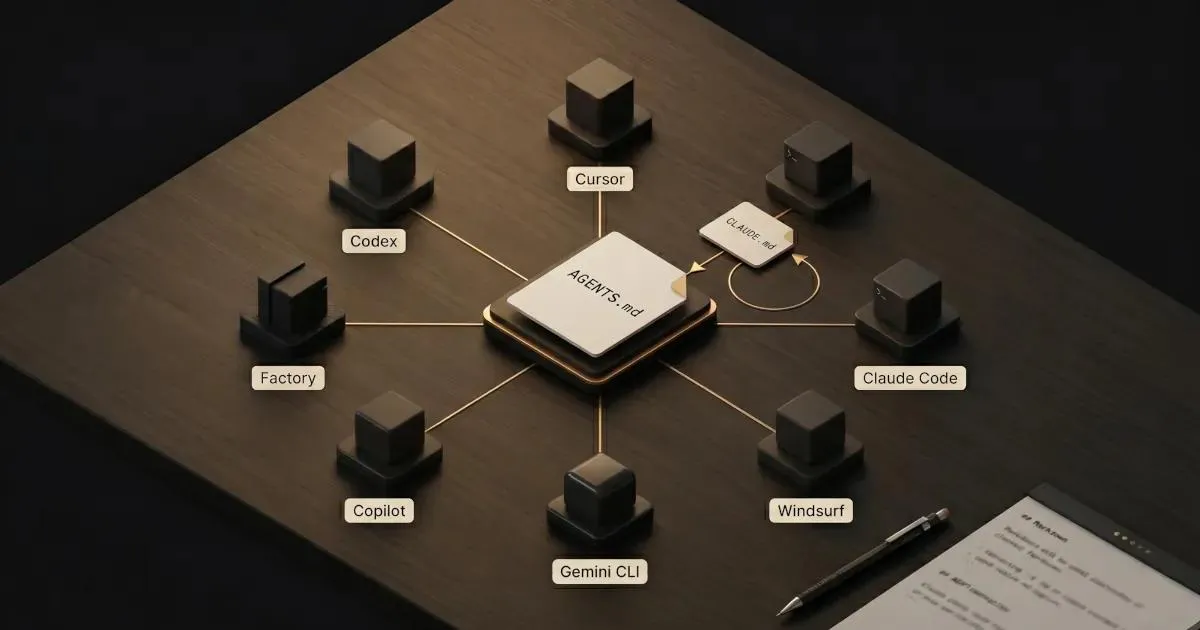
If you've been maintaining separate instruction files for every AI coding tool on your team, there's now a standard designed to eliminate that. AGENTS.md is an open, Markdown-based format for telling AI coding agents about your project - how to build it, how to test it, what conventions to follow, what to avoid. It emerged in 2025 from a collaboration between Sourcegraph, OpenAI, Google, Cursor, and Factory, and is now maintained under the Linux Foundation. Most major AI coding tools support it natively.
The notable exception: Claude Code. Anthropic's coding agent uses CLAUDE.md and as of April 2026 still doesn't natively read AGENTS.md. There's an active GitHub issue with thousands of upvotes asking for it. In the meantime, a symlink is the standard workaround.
The short answer to which you should use: if your team is Claude Code only, CLAUDE.md is perfectly fine. If you use any other tool - or a mix - write AGENTS.md and symlink CLAUDE.md to it. That's one file on disk, two filenames, zero drift. The rest of this article covers why, how to do it well, and what most teams get wrong when they write these files.
The AGENTS.md specification describes it as "a README for agents" - a Markdown file at your repository root that tells AI coding agents what they need to know to work in your project. Before AGENTS.md, every AI coding tool had its own instruction file: .cursor/rules, .clinerules, .github/copilot-instructions.md, CLAUDE.md, GEMINI.md. The content was nearly identical across all of them - same build commands, same code style, same architectural constraints - but fragmented across incompatible filenames. Teams using multiple tools were writing the same instructions repeatedly and watching them drift out of sync as the tools evolved at different paces.
AGENTS.md's solution is deliberately simple: pick one filename, pick one format (plain Markdown), and agree to read it. No schema required. No required sections. No YAML frontmatter. The AGENTS.md GitHub repository defines the spec, such as it is, and the minimalism is intentional.
What belongs in it: one-sentence project description, package manager (if not npm), exact build and test commands, code style conventions worth calling out, architectural decisions and their rationale, security gotchas, and PR conventions. The heuristic is: "what would you tell a senior engineer joining the project on their first day?" If they'd need it on day one, it probably belongs. If a linter enforces it deterministically, it doesn't.
A few things are fixed by the spec :
AGENTS.md - uppercase, exact. No alternatives.That's largely it. The spec deliberately avoids mandating structure because it has to work across tools with very different architectures and use cases. You can't technically "violate" the spec by writing a poorly structured AGENTS.md - you can only write one that doesn't help your agents.
| Tool | AGENTS.md support | Notes |
|---|---|---|
| OpenAI Codex | ✅ Native | One of the founding tools |
| Google Jules / Gemini CLI | ✅ Native | |
| Cursor | ✅ Native | Also supports its own .cursor/rules format |
| Factory (Droids) | ✅ Native | |
| GitHub Copilot | ✅ Native | Added support after initial launch |
| Windsurf | ✅ Native | |
| Aider | ✅ Native | |
| Zed | ✅ Native | |
| Warp | ✅ Native | |
| Kilo Code | ✅ Native | Replaced its own "memory bank" feature |
| Claude Code | ❌ Not natively supported | Uses CLAUDE.md instead. Requires symlink workaround. |
The table above reflects tool support documentation as of April 2026.
Claude Code is the notable outlier. As of this writing, Anthropic hasn't added AGENTS.md reading to Claude Code. GitHub issue #6235 on the Claude Code repository has accumulated thousands of upvotes from teams that want this. Anthropic hasn't provided a timeline. The prevailing workaround is a symlink - explained in detail below.
CLAUDE.md is Anthropic's proprietary instruction format, used by Claude Code. It predates AGENTS.md, and in terms of raw expressiveness for Claude-specific workflows, it's more capable. That's worth stating plainly rather than burying, because the comparison only makes sense if you understand what CLAUDE.md can actually do.
Capabilities CLAUDE.md has that AGENTS.md lacks (as of the current specs):
@imports - You can reference other files from within CLAUDE.md, and Claude Code will pull them in when relevant. This enables progressive disclosure: keep the root file lean, and point to deeper documentation only when it's needed. In practice, this looks like a root CLAUDE.md that defines global conventions and imports subsystem-specific docs - @docs/auth-patterns.md, @docs/api-conventions.md - only when Claude Code is working in those areas. If you have a sprawling codebase with distinct subsystems, each with its own conventions, @imports is the difference between a 2,000-line instruction file that burns your context budget and a 60-line root file that surfaces the right detail at the right time.
Path-scoped rules - Rules can specify via frontmatter which file paths they activate for. A frontend rule only activates when Claude Code is working in /src/components/. A database migration rule only surfaces in /db/migrations/. In a large monorepo, this is a meaningful difference from the flat-file model AGENTS.md uses. The practical benefit: you can encode rules that are correct for one part of your codebase and actively wrong for another - something a single flat AGENTS.md can't express without either omitting the rule or applying it globally where it doesn't belong.
Hierarchical memory - CLAUDE.md can exist at multiple levels: user (personal, not committed), project (repo-level), and local (.claude/CLAUDE.local.md for personal overrides). This lets individual developers layer their own preferences - preferred verbosity level, personal aliases, local paths - on top of the shared project instructions without touching the committed file. For teams where individual workflow preferences vary significantly, this is a real quality-of-life feature.
Auto memory - Claude Code can write to its own memory files as it learns about your project, without explicit user prompting. When you correct Claude Code or establish a convention mid-session, it can persist that as a memory rather than requiring you to manually update the instruction file. The practical outcome: your CLAUDE.md evolves to reflect what you've actually taught Claude Code, not just what you thought to write down at setup.
The /init command - Claude Code can scaffold a CLAUDE.md from your existing project structure. Convenient for getting started, though the output tends toward verbosity (more on that in the authoring section).
None of these features exist in AGENTS.md, and none of them are available when using any tool other than Claude Code. That's the core trade-off: CLAUDE.md offers more expressiveness for complex, Claude-specific workflows; AGENTS.md offers portability at the cost of that expressiveness. Neither is the "better" format - they make different bets about what matters. If you're running a large monorepo on Claude Code exclusively, the CLAUDE.md feature set is genuinely valuable. If you're on a mixed-tool team with straightforward instructions, those features are power you'll never use.
The decision breaks down cleanly into three cases.
Use AGENTS.md as primary when:
Use CLAUDE.md as primary when:
@imports for progressive disclosure across large or multi-team codebasesUse both (the pragmatic default) when:
Most teams I talk to end up in the "use both" bucket. The good news is that keeping them in sync is mostly a one-line command.
The standard approach: write your instructions in AGENTS.md, then symlink CLAUDE.md to it. When Claude Code reads CLAUDE.md, it's reading the same file. When Cursor reads AGENTS.md, it's reading the same file. Any update to either updates both automatically. Git tracks symlinks natively, so teammates get the same setup on clone.
Starting from scratch:
# Create AGENTS.md, then create the symlink
touch AGENTS.md          # write your content here
ln -s AGENTS.md CLAUDE.md
Migrating from an existing CLAUDE.md:
# Move CLAUDE.md to AGENTS.md, then symlink back
mv CLAUDE.md AGENTS.md && ln -s AGENTS.md CLAUDE.md
This pattern is well documented in the migration guides that have emerged from the community since AGENTS.md launched.
Monorepo setup: repeat at every level. Each directory that has an AGENTS.md gets a CLAUDE.md symlink. The pattern scales cleanly.
Windows caveat: if symlinks come through as plain text files after cloning, run:
git config core.symlinks trueThen re-clone, or manually recreate the symlink. Windows symlink support in Git requires developer mode or elevated permissions on older setups.
On committing symlinks: some teams gitignore CLAUDE.md symlinks and recreate them via a setup script on clone - cleaner from a repository management standpoint, but adds onboarding friction. Others commit the symlinks directly. The default recommendation is to commit them unless there's a specific repo policy reason not to.
What not to do: maintain two separate copies and manually sync them. They will drift. Every team that has tried this eventually discovers the hard way that one file gets updated and the other doesn't. The symlink exists precisely so you don't have to think about it.
Now that you have the file, how do you write it well? This is where most guides stop at "here are the sections" and leave you with a generated blob that actively works against you. Authoring quality matters more than comprehensiveness.
A one-sentence project description. Treat it as a role prompt for the agent - it sets the semantic context for everything that follows. "This is the API backend for a B2B SaaS platform; customers are enterprises with strict security requirements" changes how an agent interprets every other instruction.
Package manager, if not npm. Agents will default to npm. If you're using pnpm, yarn, bun, or a Python project using uv - say so explicitly.
Exact build, test, lint, and dev-server commands. Agents execute these verbatim. "Run the tests" is useless; pnpm test -- --testPathPattern=src/auth is actionable. Include the flags your team actually uses.
Testing instructions. Framework name, how to run a single test file, whether coverage is required before committing, and how to read test output if it's non-standard.
Code style rules that aren't obviously inferable from the codebase. If you use tabs when the industry defaults to spaces, say so. If there's an unusual naming convention in one module, note it. Don't document what a linter enforces - more on that shortly.
Architectural constraints with their rationale. "We use Redux, not Zustand" is a fact. "We use Redux because our state synchronization requirements with the backend require middleware plugins Zustand doesn't support" is an instruction the agent can reason about. Rationale makes constraints more durable - the agent can apply the principle to cases you didn't anticipate.
Security gotchas. What never gets logged. What files the agent should never modify. What fields are PII under your regulatory constraints. These are easy to forget and high-cost to get wrong.
PR conventions. Commit message format, PR title structure, and whether squash-merge is required.
Domain vocabulary. If your product uses "organization" where other tools use "workspace" or "tenant," say so. Vocabulary mismatches produce subtle and annoying bugs in agent-generated code.
Anything a linter or formatter enforces deterministically. As HumanLayer's guide on writing good CLAUDE.md files puts it well: don't send an LLM to do a linter's job. It's slower, less reliable, and burns context budget on rules that could be enforced automatically. If ESLint handles it, leave it to ESLint.
Generic style guidelines from language standard documentation. The agent already knows Python prefers snake_case. Don't repeat what's in PEP 8.
Auto-generated initialization dumps. The /init command and similar scaffolding tools are tempting because they produce a "comprehensive" file. But comprehensiveness is the problem - a generated file floods the context with information that would be better progressively disclosed via @imports or just omitted. Generated files tend to include filesystem structure, paths to configuration files, and descriptions of every dependency - almost none of which belong in an instruction file.
File system structure. It changes too fast. Stale path references in your AGENTS.md will actively mislead agents into trying to write to files that don't exist or importing from paths that have moved.
HumanLayer's research introduced a useful concept here: frontier thinking LLMs can reliably follow roughly 150–200 instructions. Smaller and non-thinking models follow fewer. Every bullet point in your AGENTS.md draws against that budget on every single session - not just when the instruction is relevant. This is why the best AGENTS.md files tend to be surprisingly short. The goal is high signal density, not comprehensive coverage.
What this looks like in practice: a team starts with a lean AGENTS.md - 30 lines, the essentials. Over six months, they add instructions every time an agent does something wrong: formatting rules, path conventions, dependency preferences, and notes about deprecated patterns. A year in, the file has 200+ lines. They notice their agents are starting to miss earlier instructions - not because the instructions disappeared, but because the budget is exhausted and the model is prioritizing later, more locally relevant content. The file that was supposed to help is now actively degrading output quality. The solution is pruning: cut anything a linter handles, cut generic rules, cut stale architectural notes. Get back to the essentials. This is not a hypothetical failure mode; it's one of the most common things teams report after running AI coding agents at scale.
For reference, the OpenAI repository reportedly contains 88 AGENTS.md files - one at the repo root, plus nested files at package and directory levels. That's progressive disclosure at scale: each agent only reads the files relevant to where it's working.
This is a starting point, not a comprehensive example. Adapt it to your project; remove every line that doesn't apply.
# Project: [your-project-name]

[One-sentence description of what this project is and who uses it.]

## Setup

- Package manager: pnpm
- Node version: 20.x (see `.nvmrc`)
- Install: `pnpm install`

## Commands

| Task | Command |
|------|---------|
| Dev server | `pnpm dev` |
| Build | `pnpm build` |
| Tests | `pnpm test` |
| Single test | `pnpm test -- --testPathPattern=<path>` |
| Lint | `pnpm lint` |

## Architecture

- [Framework/library choices with brief rationale]
- [Monorepo structure if applicable]

## Conventions

- [Non-obvious naming conventions]
- [State management approach]
- [Error handling pattern]

## Security

- Never log [field names]
- Never modify [protected files or paths]

## PR conventions

- Commit message format: [your format]
- Branch naming: [your format]
Link to context as an engineered artifact if you want a deeper framework for thinking about what belongs in persistent instruction files vs. what belongs in session-level context.
AGENTS.md solves the repo-level context problem: what every agent working in this codebase should always know. That's a real and valuable problem. The standard is well-designed for it.
But it's one layer. Session-level context - the specific PRD you're implementing today, the customer ticket you're responding to, the Notion page describing the design system update - isn't a repo artifact. It changes task to task. It shouldn't live in AGENTS.md, and it probably shouldn't live anywhere persistent. Putting task-specific context in your AGENTS.md is how you end up with the instruction budget problem described above: every line competes for attention , and the file that's supposed to stay lean accumulates task-specific cruft that becomes noise.
At HiveTrail, we build Mesh for exactly this session-level context layer - the task-specific PRDs, files, and prompts that shouldn't live in your repo but that your agent still needs to see. AGENTS.md and tools like Mesh solve different problems at different layers; writing a great AGENTS.md doesn't remove the need for good session-level context, and vice versa.
The mental model worth keeping: your AI coding workflow has multiple context layers. AGENTS.md handles the durable, versioned, shared layer - what every agent should know about the codebase. Session context handles the ephemeral, task-specific layer - what this agent needs to know right now. CLAUDE.md's auto-memory handles the accumulated session-history layer - what Claude Code has learned over time. They compose. None of them is the whole answer, and treating any one of them as sufficient leads to the other problems.
Context engineering as a practice is partly about being deliberate about which layer handles which information - and resisting the temptation to put everything in one file because it's convenient.
If you want the bigger picture on where context quality fits in the 2026 agentic coding landscape, the Anthropic 2026 Agentic Coding Trends Report is worth reading - every trend in it bottlenecks on how well your agent understands its environment. For the research-frontier version of this story, the Agentic Context Engineering framework post goes deeper on how context engineering is being formalized as a discipline beyond individual file formats.
The author is the founder of HiveTrail , where he's building Mesh - a desktop tool for assembling just-in-time context for LLMs from Notion, local files, and prompt libraries. He writes about context engineering, AI development workflows, and the practical side of building with LLMs.
On this page
AGENTS.md is an open, Markdown-based standard for providing instructions to AI coding agents. Placed at the root of a project repository, it tells agents about the project's build setup, test commands, code conventions, architectural constraints, and security requirements. The standard emerged in 2025 from a collaboration between Sourcegraph, OpenAI, Google, Cursor, and Factory, and is now governed by the Agentic AI Foundation under the Linux Foundation.
As of April 2026, Claude Code does not natively support AGENTS.md. It uses its own format, CLAUDE.md. There is an active GitHub issue (#6235) requesting AGENTS.md support - it has accumulated thousands of upvotes from the developer community, but Anthropic has not provided a timeline for adding it. The standard workaround is to write AGENTS.md and create a symlink from CLAUDE.md to it: ln -s AGENTS.md CLAUDE.md.
AGENTS.md is an open, cross-tool standard supported natively by most major AI coding tools. CLAUDE.md is Anthropic's proprietary format, used exclusively by Claude Code . CLAUDE.md supports additional capabilities - @imports for referencing external files, path-scoped rules that activate only for specific file paths, and hierarchical memory across user, project, and local scopes - but all of those features are Claude Code-only. AGENTS.md trades those capabilities for cross-tool portability.
Use AGENTS.md as your primary file if you use any AI coding tool other than Claude Code, or a mix of tools. Use CLAUDE.md as primary if your team is committed to Claude Code and wants features like @imports and path-scoped rules. Most teams end up using both: they write AGENTS.md as the canonical source and symlink CLAUDE.md to it (mv CLAUDE.md AGENTS.md && ln -s AGENTS.md CLAUDE.md), which maintains a single source of truth while supporting all tools.
Include: a one-sentence project description, package manager, exact build/test/lint/dev commands, testing framework and how to run a single test, non-obvious code style conventions, architectural decisions with rationale, security gotchas, PR conventions, and domain-specific vocabulary.
Leave out: anything a linter enforces automatically, generic language style guidelines, file system structure (changes too fast to stay accurate), and auto-generated initialization dumps. Keep the file short - frontier LLMs can reliably follow roughly 150-200 instructions, and every line competes for that budget on every session.

A practitioner's read on Anthropic's 2026 Agentic Coding Trends Report - the eight trends, the context problem underneath them, and what to do about it.
Read more about We Read Anthropic's 2026 Agentic Coding Trends Report. Here's What It Actually Means for Engineering Teams.
Long-running AI agents lose context over time. The fix isn't bigger context windows. It's a curated handoff between coding sessions. Here's the protocol.
Read more about Why Long-Running AI Agents Forget: A Session Context Strategy
Resolve the claude.md vs agents.md overlap. Separate your repo rules, session memory, skills, and per-task context into a clean 4-layer stack.
Read more about CLAUDE.md vs AGENTS.md: The 4-Layer AI Coding Memory Stack