 Ben •
Ben •
You know the pattern. You open a fresh Claude Code session, paste the task in, and the first few responses are sharp. Claude reads the right files, makes sensible decisions, and follows your architecture conventions. Then, somewhere around the 45-minute mark, things start to drift.
It asks about a file path that it read twenty minutes ago. It contradicts an architectural decision you both agreed on earlier in the session. It proposes a refactor that undoes work it just finished. The responses get wordier but somehow less useful.
You didn't change anything. The model didn't crash. There's no error in the log. But something clearly went wrong.
Here's what I've learned after building HiveTrail Mesh - a tool designed specifically to solve this problem upstream - and after hitting this wall dozens of times in my own Claude Code sessions: the degradation isn't random, and it isn't a bug. It's structural. And most of the common fixes only address symptoms. The root cause starts before you type your first message.
The phenomenon has a name. Anthropic's own engineering documentation calls it context rot, defining it directly: "Context must be treated as a finite resource with diminishing marginal returns." ( Anthropic, Effective Context Engineering for AI Agents, September 2025 )
But what does that actually mean mechanically?
Every Claude Code session has a context window - a finite amount of text (measured in tokens) that the model can "see" at any given moment. Your messages, Claude's responses, every file it reads, every bash command output, every tool call result - it all goes in. And here's the critical part: the transformer architecture underlying Claude processes all of this by comparing every token against every other token to compute relationships. This works beautifully when the context is small and tightly relevant. As the context grows with noisy, loosely related content, those pairwise comparisons get stretched thin.
The result: performance doesn't fall off a cliff. It degrades gradually. Attention that should be focused on your current task gets diluted by everything that's accumulated in the window since you started.
The research on this is unambiguous. Chroma's 2025 study, Context Rot: How Increasing Input Tokens Impacts LLM Performance , tested 18 frontier models - including GPT-4.1, Claude 4, and Gemini 2.5 - and found that every single one performed worse as input length increased. Not some. Not most under certain conditions. All of them, without exception. Some models held at 95% accuracy, then dropped to 60% once the input exceeded a certain length threshold. The drop wasn't gradual - it was a cliff edge after a saturation point.
Morph's analysis of the same research adds an important nuance for coding agents specifically : coding agents have three properties that make context rot worse than average. First, context is accumulative - every file read, grep result, and tool output stays in the window for the rest of the session. Second, distractor density is high - code search returns semantically similar results across many files, creating more opportunities for attention to be misled. Third, task horizons are long - a real coding task takes 15–60 minutes, during which context continuously degrades.
There's a second mechanism compounding the problem. Stanford researchers (Liu et al., Lost in the Middle: How Language Models Use Long Contexts , TACL 2024) established one of the most cited findings in LLM reliability: models attend strongly to the beginning and end of their context, and poorly to the middle.
In a multi-document question-answering setup with 20 documents, accuracy dropped by more than 30% when the relevant document was placed in positions 5–15 rather than position 1 or 20. The model had all the information it needed - it just couldn't effectively attend to it from the middle of a crowded window.
Critically, this effect doesn't require the context window to be full. It appears at moderate context lengths and worsens as the window grows. The relevant information doesn't need to be absent - it just needs to be in the wrong position relative to everything else that's accumulated.
For a typical Claude Code session, the practical consequences are specific and predictable:
config.py at the start of the session to understand the data model, and the session has since grown substantially, the model may produce code that contradicts that schema - not because the information isn't there, but because it's no longer in a high-attention position.Morph's analysis of context rot points to a particularly counterintuitive finding : models performed better on randomly shuffled documents than on logically structured ones. Logical structure creates plausible distractors - adjacent documents share terminology, concepts, and patterns, making it harder for the model to isolate the relevant signal. A well-organised codebase is, perversely, harder for an LLM to search than a randomly arranged one. This is why structured, labelled context blocks - where sections are explicitly tagged by type - outperform even well-organised raw dumps.
The upshot: position and structure matter as much as content. A piece of information in the first 10% of the context window has meaningfully more influence on the model's output than the same information in the middle 60%. Every message you exchange with Claude pushes your earlier constraints further toward that low-attention zone.
This isn't theoretical. A developer recently filed GitHub issue #34685 on the Claude Code repository documenting exactly what this looks like in practice, using the 1M context window model (claude-opus-4-6):
That's less than halfway through a context window that Anthropic advertises as capable of holding entire codebases. The effective high-quality range appears to be roughly the first 400K tokens. As the issue author asks: if the practical ceiling is 400K tokens, should that be what's communicated to users rather than 1M?
This isn't a criticism of Anthropic - it's a fundamental constraint of how transformer attention works at scale. The compaction mechanics are also relevant here : Claude Code reserves a ~33K token buffer and triggers auto-compaction when usage hits ~83.5% of the window. But compaction is lossy. As MindStudio's analysis notes, running /compact after quality has already dropped is less effective than doing it proactively - the compressed summary may capture confused outputs alongside the good ones.
Context rot is insidious because it rarely announces itself. You don't get an error. You get a gradual erosion of quality that's easy to attribute to a bad prompt or a complex task. Here are the specific signals worth watching for:
Claude re-reads files it already processed. If you notice Claude using a read_file tool call on a file it clearly already loaded earlier in the session, the earlier read has degraded in the window. It's compensating by fetching the information again - burning more context in the process.
It contradicts earlier architectural decisions. You settled on an approach for your auth layer 30 messages ago. Now Claude is suggesting something that contradicts it without acknowledging the earlier decision. The constraint has drifted into the middle of the context window and lost attention weight.
Responses get longer but less precise. This is a counterintuitive tell. As context fills, the model sometimes compensates by generating more text - adding hedging, restating things, or providing options rather than direct answers. Word count goes up, signal goes down.
Circular debugging loops. You tell Claude a fix didn't work. It suggests a variation. That doesn't work either. It cycles back to an approach it already tried. This is classic context rot - the session history is creating distractors that prevent the model from making forward progress.
It forgets your "don't do X" rules. Constraints stated early in the session - "don't use global state," "always write tests for new functions," "never modify the config file directly" - are exactly the kind of instruction that ends up in the middle of a long context and loses effective attention weight.
If you're seeing two or more of these in a session, you're in context rot territory. The sooner you act, the less you lose.
Let me be clear: the standard context management advice is genuinely useful. Here's what works:
/clear between unrelated tasks. If you've finished one feature and are starting something new, clear the session. You lose the history, but you regain a clean, high-attention context for the new task.
/compact at natural task boundaries. As Anthropic's own best practices documentation puts it: "Most best practices are based on one constraint: Claude's context window fills up fast, and performance degrades as it fills." Running /compact after completing a distinct phase - finished the auth module, finished a refactor - creates a compressed checkpoint before quality degrades.
Keep CLAUDE.md lean and targeted. Your CLAUDE.md file is read into every session. Each token in it costs budget before you type your first message. Keep it focused on things that are genuinely session-critical: architecture patterns, hard constraints, and current sprint context. Remove anything that isn't actively guiding behavior.
Break large tasks into focused sessions. A 200K context session covering five loosely related tasks is far more prone to rot than five 40K sessions each tackling one thing precisely.
These techniques all work. But here's the fundamental limitation of every single one of them: they're reactive. They manage the window after it has already started filling with noise. They don't address what goes in at session start - and that's where most of the damage is actually done.
Here's the insight that changed how I work, and that drove the entire design of Mesh.
Context rot isn't primarily a volume problem. It's a signal-to-noise ratio problem.
A session loaded with 50,000 tokens of tightly relevant, well-structured context will outperform a session loaded with 15,000 tokens of loosely assembled raw files. More tokens can mean worse results - not because the model ran out of space, but because the relevant signal is now competing for attention against noise.
Google's Chrome DevTools team documented this empirically in a January 2026 post on token-efficient formats for AI assistance : when they replaced raw JSON performance trace data with a compact, structured format designed specifically for LLM consumption, they were able to fit dramatically more useful context in the window. The conclusion: "The optimized format enables a performance agent that can maintain a longer conversation history and provide more accurate, context-aware answers without getting overwhelmed by noise."
The New Stack's analysis of token-efficient data preparation quantified this more directly : organizations typically discover 40–60% waste in existing serialization approaches. Field names repeated across every record, verbose JSON nesting, raw prose with filler content - these consume tokens without conveying information the model needs.
This reframes the problem entirely. Instead of asking "how do I manage my context window during a session?", the better question is: "what's the highest signal-to-noise ratio I can achieve in the context I load before the session starts?"
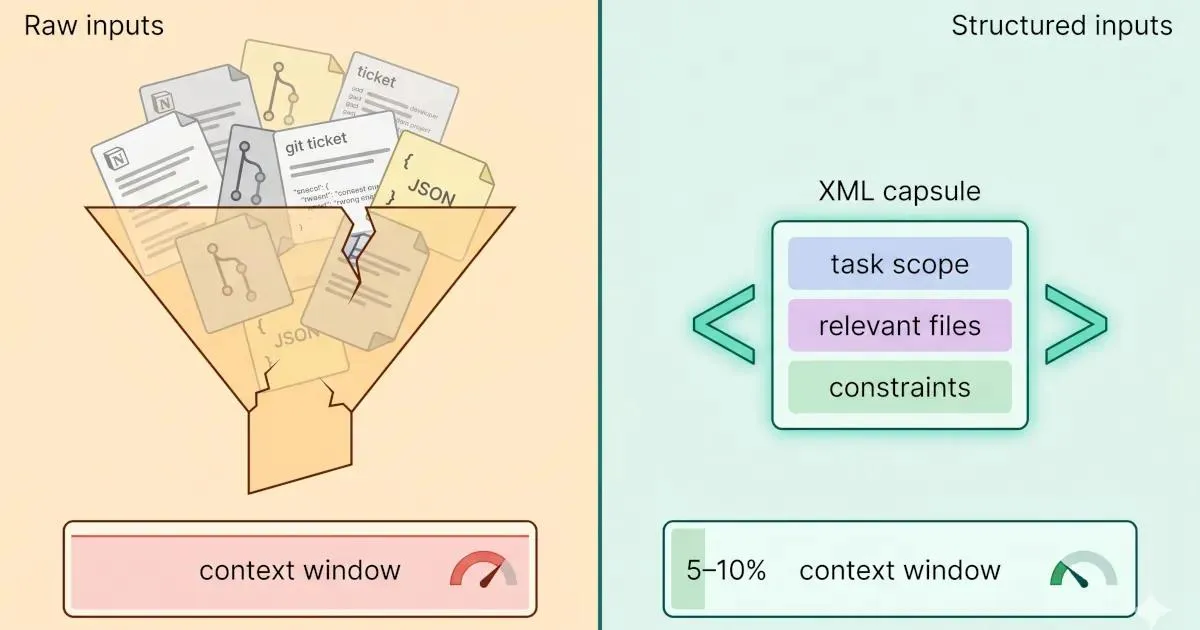
Let me make this concrete. Here's a typical approach most developers use when starting a Claude Code session for a feature task:
Context provided (raw approach):
- Entire Notion spec document (pasted): ~4,200 tokens
- Three related source files (full content): ~6,800 tokens
- Recent Git log (last 30 commits, full messages): ~2,100 tokens
- Relevant tickets (copy-pasted from Jira): ~1,800 tokens
Total: ~14,900 tokens - loaded before typing one word of the actual task
Much of this is noise. The Notion spec includes meeting notes, background context, and historical discussion that's irrelevant to the specific task. The full source files include sections that won't be touched. The Git log includes commits from unrelated workstreams. The ticket copy-pastes include formatting artifacts, metadata, and comment threads.
Now contrast that with a Mesh-assembled context block for the same task:
<context>
  <task_scope>Implement rate limiting for the GitHub API service (issue #41)</task_scope>

  <relevant_code>
    <file path="src/services/github_service.py" scope="rate_limit_related">
      <!-- Only the 3 methods relevant to rate limit implementation - 280 tokens -->
    </file>
    <file path="src/models/config.py" scope="rate_limit_config">
      <!-- Config class with existing rate limit fields - 95 tokens -->
    </file>
  </relevant_code>

  <spec_excerpt privacy_scanned="true">
    <!-- Core requirements from Notion: 4 bullet points, no filler - 180 tokens -->
  </spec_excerpt>

  <git_context>
    <!-- Last 5 commits touching github_service.py only - 140 tokens -->
  </git_context>
</context>
Approximate token count for the structured block: ~700 tokens. Same task, same information where it matters - roughly 95% fewer tokens devoted to context before the session starts. That's not an artificial example. It's the difference between a session that degrades in 40 minutes and one that stays sharp for two hours.
The structured format does two things beyond compression. First, it uses labels (<task_scope>, <relevant_code>, <spec_excerpt>) that help the model's attention mechanism understand the type of each piece of context, which improves retrieval and reduces the lost-in-the-middle effect. Second, it front-loads the most important constraint (the task scope), putting it where primacy bias works in your favor.
Before you start your next Claude Code session on a substantive task, run through these five steps:
1. Define the scope precisely. Write one sentence describing what this session will accomplish. This becomes your <task_scope> or the first line of your CLAUDE.md session block. If you can't write it in one sentence, the task may be too broad for a single session.
2. Identify the 3–5 files that actually matter. For most feature tasks, there are 2–5 files in your codebase that are genuinely relevant. Load those, not the entire service layer. If you're uncertain, use /context to check usage after loading and trim ruthlessly.
3. Filter your external sources for recency and relevance. If you're pulling from Notion or a ticket system, bring only the spec requirements for this task - not the full page, not the historical comments, not the background. A 200-token excerpt of the right spec section is worth more than a 4,000-token full page dump.
4. Structure with clear section labels. Whether you're building the context manually or using a tool, add structural labels to the top of each context section. ## Task scope, ## Relevant files, ## Constraints - these act as attention anchors that help the model navigate a longer context without losing track.
5. Set a pre-session token budget ceiling. For a focused single-feature session, aim for under 3,000 tokens of loaded context before the task prompt. For a larger architectural task, 5,000–8,000 tokens is reasonable. If your pre-session context exceeds that, you're loading noise - go back and filter.
This checklist isn't the last word on the topic - for a deeper treatment, see the practical guide to building an LLM context stack and the foundational piece on context engineering published here on the HiveTrail blog.
Before going into the real-world evidence, it helps to see the cost difference side by side. This table compares a typical raw-input approach against a structured, filtered context block for the same feature task - implementing rate limiting for a GitHub API service.
| Input type | Approach | Approx. tokens | Relevance to task | Attention risk |
|---|---|---|---|---|
| Full Notion spec page | Paste entire page | ~4,200 | ~15% (rest is history, discussion, background) | High - noise pushes task scope into middle |
| Three full source files | Load full file content | ~6,800 | ~30% (most code won't be touched) | High - irrelevant methods create distractors |
| Full Git log (30 commits) | Raw git log output | ~2,100 | ~10% (most commits are unrelated workstreams) | Medium - commit messages from other features add noise |
| Jira tickets copy-paste | Full ticket with comments | ~1,800 | ~20% (useful requirements buried in thread) | Medium - comment threads inflate context |
| Raw total | ~14,900 tokens | ~18% signal | High rot risk from first message | |
| Filtered spec excerpt | Requirements only | ~180 | ~95% | Minimal |
| Scoped file sections | Only methods relevant to rate limiting | ~375 | ~90% | Minimal |
| Filtered Git history | Commits touching target files only | ~140 | ~95% | Minimal |
| Structured XML block | Labelled, token-budgeted, privacy-scanned | ~700 | ~92% | Low - labels act as attention anchors |
| Structured total | ~700 tokens | ~93% signal | Low rot risk, session stays sharp longer |
The 14,900-token raw session and the 700-token structured session contain the same useful information. The difference is the noise ratio, and according to the Chroma research, that noise directly degrades every output the model produces for the rest of the session.
This isn't a purely theoretical argument. There are documented cases from real engineers, filed publicly, that illustrate exactly how this plays out in production development work.
The Ramp engineer and the 100K token search spiral. Anton Biryukov, a software engineer at Ramp, described a scenario that will be familiar to anyone doing serious Claude Code work : "Claude Code can burn 100K+ tokens searching Datadog, Braintrust, databases, and source code. Then compaction kicks in."
The mechanism here is important. Biryukov isn't describing a session that got too long - he's describing a session where the input quality of each tool call is poor. Each Datadog query, each database search, each source file read returns raw, unfiltered output that gets dumped wholesale into the context. By the time compaction triggers, the window is full of search results, most of which were intermediary steps rather than final answers. The session has to restart from a compressed summary that may have lost the connections between findings.
The fix isn't a bigger context window. The 1M context window, which Anthropic rolled out to address exactly this kind of workflow, helped - but Biryukov's observation was made after the 1M window shipped. More capacity delays the problem. Filtering input quality at the source eliminates it.
The RBAC implementation that lost its own schema decisions. GitHub issue #28984 documents a particularly instructive failure mode. A developer asked Claude Code to implement an RBAC system across routes, middleware, database schema, and tests - a realistic multi-file task. At ~15–20 tool calls in, compaction triggered. After compaction:
The developer's proposed fix was: "Compaction should prioritize retaining file contents and architectural decisions over conversation history." That's the right instinct - but it's still a reactive frame. The deeper issue is that loading full file contents for every file that might be touched (rather than the specific functions that will be touched) bloated the context from the start, accelerating the timeline to compaction.
Simon Willison and MCP context pollution. Simon Willison - one of the most widely-read voices in the AI developer tools community, and the creator of Datasette - identified the exact same input quality problem in a different context : "Context pollution is why I rarely used MCP."
The problem: connecting 5–6 MCP integrations (Figma, Playwright, GitHub, a few custom servers) caused their tool definitions to consume 30–50% of the available context window before a single task message was sent. The model was starting every session with half its attention budget already spent on tool schemas it might never need for the current task.
Anthropic's solution - on-demand tool loading, where tool definitions are only loaded when the semantic search identifies them as relevant - reduced this dramatically. Willison's reaction: "Now there's no reason not to hook up dozens or hundreds of MCPs."
This is precisely the upstream argument applied to tools rather than files: don't load everything that might be relevant. Load only what's relevant to the current task. The principle is identical whether you're talking about file contents, spec documents, Git history, or MCP tool definitions.
The pattern across all three cases. None of these are model failures. The models are working as designed. The constraint in every case is what was competing for the model's attention before the productive work started. Each case also has the same structural fix: filter inputs for relevance at the source, before they enter the context window, rather than managing the consequences of noisy inputs mid-session.
This is the distinction that most context management advice misses. /compact is a good tool for a session that's already running. A structured, token-budgeted pre-session context is a better tool for a session that hasn't started yet.
Every piece of advice in the "manage your context window" ecosystem - /clear, /compact, CLAUDE.md hygiene, focused sessions - is sound. I use all of it. But it treats a problem that's partly self-inflicted.
The real leverage is upstream: what you load before the session starts determines the baseline signal-to-noise ratio the session will operate at. A session starting with 700 tokens of structured, relevant context is fundamentally different from one starting with 15,000 tokens of loosely assembled raw content - even if the total context capacity is identical.
I built HiveTrail Mesh because I kept hitting this wall in my own development work. The tool assembles a token-optimised, structured XML context block from your Notion pages, local files, and Git history - scanning for privacy issues, filtering for relevance, and enforcing token budgets - so your Claude Code session starts with maximum signal and minimum noise.
If you want to try the pre-session context workflow described in this post, HiveTrail Mesh beta is open now.
On this page
Context rot is the gradual degradation of output quality that occurs as a Claude Code session's context window fills with accumulated tokens such as messages, file reads, tool outputs, and responses. As more tokens accumulate, the model's attention mechanisms become less effective at focusing on what matters for the current task, producing less accurate, less coherent responses. The term was formalized by Chroma's 2025 research and is now used in Anthropic's own documentation.
The transformer architecture underlying Claude compares every token in the context against every other token to compute relationships. As the context grows, this comparison gets spread thinner, and the signal-to-noise ratio drops. Information from earlier in the session, especially constraints and architectural decisions, tends to fall into the "middle" of the context window where attention is weakest. This is the lost-in-the-middle effect, documented in Liu et al.'s Stanford research .
/compact helps, but it's a reactive mitigation, not a structural fix. It compresses conversation history into a summary, freeing token budget. However, it works best when run proactively at natural task boundaries, not after quality has already degraded. If you compact a session that's already showing context rot symptoms, the summary may preserve confused outputs alongside the good ones.
Based on the GitHub issue #34685 report , real-world degradation with Opus 4.6 was reported starting at approximately 20% of the 1M context window, around 200K tokens. By 40%, automatic compaction triggered. By 48%, the model itself recommended restarting the session. For a 200K context window model, observable degradation can start considerably earlier depending on the quality of what's been loaded.
Focus on input quality, not just session hygiene. Load only the files directly relevant to the current task. Extract relevant excerpts from specs and tickets rather than pasting full documents. Structure your context with clear section labels. Set a token budget for pre-session context (under 3,000 tokens for focused tasks) and trim anything that doesn't directly serve the work. This is what the HiveTrail Mesh beta automates, pulling from Notion, local files, and Git, filtering for relevance, and assembling a structured, token-budgeted context block before the session starts.

Chroma tested 18 frontier LLMs and found every one degrades as input length grows. Here is what their context rot study proves developers must change.
Read more about Context Rot Is Real: What Chroma's 18-Model Study Found
Read the Anthropic context engineering guide 2026 but stuck on implementation? Translate its four pillars into a concrete checklist for your next LLM session.
Read more about Anthropic Context Engineering Guide 2026: A Field Manual
Long-running AI agents lose context over time. The fix isn't bigger context windows. It's a curated handoff between coding sessions. Here's the protocol.
Read more about Why Long-Running AI Agents Forget: A Session Context Strategy