 Ben •
Ben •
Here is a pattern that repeats dozens of times a day in developer workflows everywhere. A developer opens Claude or ChatGPT, copies a chunk of code from their editor, pastes a Notion spec, adds a rough description of what they want, and sends it. The output is mediocre - generic, missing context, wrong in ways that take longer to fix than to write from scratch. So the developer refines the prompt, adds more text, and pastes more files. The output gets marginally better. Twenty minutes have passed.
The problem is almost never the model. It is the context.
As Philipp Schmid, Technical Lead at Hugging Face, put it plainly in his widely-read 2025 post on context engineering :
"Most agent failures are not model failures anymore, they are context failures."
And Andrej Karpathy - former Director of AI at Tesla and co-founder of OpenAI - framed the discipline even more sharply when he endorsed the term "context engineering" on X in June 2025:
"In every industrial-strength LLM app, context engineering is the delicate art and science of filling the context window with just the right information for the next step."
This post is about building that discipline into your personal LLM workflow - not as an abstract concept, but as a concrete, repeatable context engineering workflow you can apply to any task. We will cover what a context stack is, where to source its components, how to budget tokens wisely, why structure matters, and how to add a privacy layer before anything leaves your machine. By the end, you will have a practical playbook you can apply starting today.
The context window is the model's working memory - the total number of tokens it can process in a single request, shared between your input and its output. As of 2026, that window ranges from 128K tokens (DeepSeek, Mistral) to 10 million (Llama 4 Scout), with Claude's 200K and GPT-5.2's 400K sitting in the mid-tier.
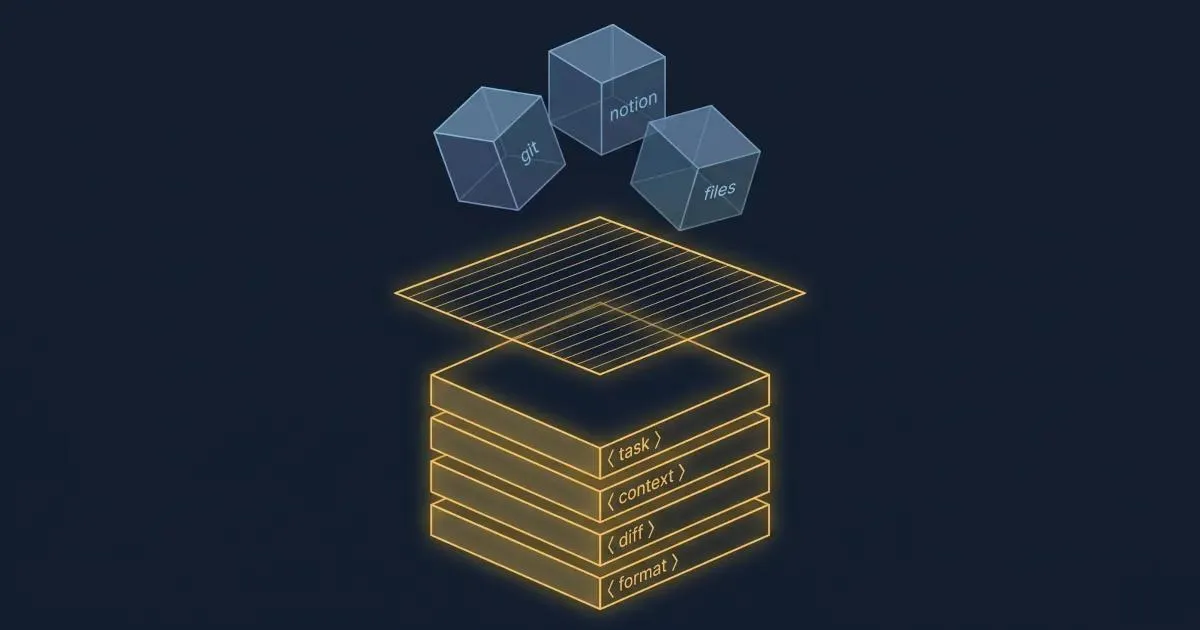
A context stack is different. It is the curated set of information sources you assemble before you open an LLM session - the deliberate process of deciding what goes in, in what order, and in what structure. Think of the context window as a whiteboard. The context stack is the act of deciding, before the meeting, exactly which diagrams, reference sheets, and notes to pin on it.
Most developers skip this step entirely. They treat the context window like a junk drawer - pasting in whatever seems related and hoping the model figures it out. This works for trivial tasks. For anything complex, it guarantees degraded output.
There are four layers to a well-built context stack:
These four layers map to how a skilled human consultant would approach a complex task: first understand the goal, then understand the environment, then review the specific case, then produce structured output. Every LLM task benefits from this same mental model.
Before we get into the mechanics, it is worth understanding why this matters at the research level - because the findings are counterintuitive and somewhat alarming.
In July 2025, Chroma Research published a landmark study: Context Rot: How Increasing Input Tokens Impacts LLM Performance . The researchers tested 18 frontier models - including GPT-4.1, Claude Opus 4, Gemini 2.5 Pro, and Qwen3-235B - and reached a finding that should change how every developer thinks about context:
"We demonstrate that even under these minimal conditions, model performance degrades as input length increases, often in surprising and non-uniform ways."
Every single model they tested got worse as the input length increased. Not some. Not most. All 18. And the degradation began well before the context window was close to full - a model with a 200K token window showed measurable performance decay at 50K tokens.
This is not a bug. It is an architectural property of transformer-based attention. As you add tokens, the signal-to-noise ratio in the model's attention mechanism deteriorates. More input means more relationships the model has to compute between tokens, and the important signal competes with an ever-larger pool of noise.
The Chroma study also identified a particularly counterintuitive finding: models perform better on shuffled context than on coherent, well-structured context when that context is long. Logical document flow actually hurts retrieval performance, because a coherent narrative creates stronger positional patterns that bias the attention mechanism away from the actual target information.
This compounds a separate, well-established finding. In 2024, Nelson F. Liu and colleagues at Stanford published "Lost in the Middle: How Language Models Use Long Contexts" in the Transactions of the Association for Computational Linguistics. They found that LLM performance follows a U-shaped curve across input positions: models attend strongly to the beginning and end of context, and significantly less to the middle. When the answer document was placed at position 10 out of 20 documents in a question-answering task, GPT-3.5-Turbo's accuracy dropped by more than 20 percentage points compared to when the answer was at position 1 or position 20.
The practical implication is stark: if you paste a long project spec, then a git diff, then a README, then your actual question, the model may largely ignore the middle material, even though it "fits" in the context window.
The solution is not a better model. The solution is a better context stack.
Building a context stack does not require new tools, infrastructure, or RAG pipelines. The raw material is already sitting in your existing workflow. Here is how to think about each source and when to use it.
If you use Notion for specs, design docs, decision logs, or sprint planning, you are sitting on the single most valuable context source for product and feature work. Yet most developers either paste raw Notion content (which includes formatting noise, sidebar metadata, and orphaned draft text) or ignore it entirely.
What to extract: the specific sections relevant to the current task. For a PR description, that might be two paragraphs from the feature spec and the acceptance criteria. For a code review, it might be the architecture decision record. Not the whole document - the relevant slices.
When not to include it: if the page is outdated, heavily formatted, or longer than ~1,500 tokens and only tangentially related to the task. Stale context is worse than no context - the model treats it as signal and reasons from incorrect assumptions.
Git output is an underused context gold, especially for developer-facing tasks like PR descriptions, release notes, code reviews, and regression analysis. A well-scoped git diff of the changed files, combined with the last 5 commit messages, gives a model nearly everything it needs to understand what changed, why, and how it fits into recent history.
The key is scoping. git diff HEAD~1 of a large codebase will produce thousands of tokens of noise. git diff HEAD~1 -- src/services/github_service.py gives you a targeted signal. Specificity is the discipline.
Here is the practical toolkit for assembling Git context:
# Get the diff for only the files you changed on this branch
git diff main...HEAD -- $(git diff --name-only main...HEAD)

# Scope to a specific file or directory
git diff main...HEAD -- src/services/github_service.py

# Get the commit narrative for this branch (concise, one line per commit)
git log main...HEAD --oneline

# Count approximate tokens before pasting (rough estimate: 1 token ≈ 4 chars)
git diff main...HEAD -- src/services/ | wc -c
# Divide by 4 for a token estimate. If over 2,000, scope more tightly.

# Show only changed function signatures without full body (useful for large files)
git diff main...HEAD -- src/services/github_service.py | grep "^[+-].*def "
These two together - git diff scoped to changed files plus git log --oneline - typically produce 500–2,000 tokens of extremely high-density context. That is more useful information per token than almost any other source in your stack.
Local files are the forgotten layer. Developers habitually paste code snippets into LLM chats, but rarely include the broader file context that explains why the code is written the way it is - the architecture notes in a README, the data schema that a function operates on, the config file that controls feature flags.
For code tasks, the most useful local files are usually: the file being modified (scoped to the relevant functions, not the whole file), any type definitions or interfaces it imports, and the test file for that module. This trio gives the model the implementation, the contract, and the expected behavior - the three things it needs to produce correct code.
For writing tasks (docs, PR descriptions, release notes), the most useful local files are usually the previous version of the document being updated and any style guide or template you want the output to follow.
This is the most underused source of all. If you have already used an LLM to produce a structured analysis, a draft spec, or a set of decisions, that output is a compressed, high-quality summary of prior reasoning. Feeding it back into a subsequent task saves both tokens and cognitive work.
A practical pattern: after any significant LLM session, extract and save a "context summary" - a brief, structured document capturing the key decisions, constraints, and outputs from that session. Next time you return to the same feature or problem, this becomes the top-level context block in your stack.
This is especially valuable for Claude Code or Cursor workflows, where sessions can span multiple days. The manual checkpoint discipline - saving a HANDOFF.md before clearing context - is one of the highest-leverage habits in a modern dev workflow. The dev.to post "I Spent Four Weeks Reading 200+ Sources on Context Engineering" documented this concretely: a single 805-line SESSION.md was consuming 17,000 tokens on every session start, loading irrelevant historical context into every conversation. After trimming it to 59 lines, task benchmark scores jumped 32 points.
Reusable context blocks are the equivalent of code snippets for context engineering. They are pre-written, curated descriptions of recurring context elements - your tech stack, coding conventions, project architecture, output templates, or persona definitions. You write them once and pull them into any relevant task.
Examples: a 300-token description of your service architecture that you include whenever asking for code that touches multiple services; a 200-token output format spec that defines the PR description template you want Claude to follow every time; a 150-token description of your team's coding standards that prevents the model from generating patterns you will just reject.
The return on investment for reusable context blocks is asymmetric: 30 minutes writing them pays dividends across hundreds of future tasks.
Knowing your sources is not enough. The harder discipline is deciding how much of each source to include, and in what order.
The most actionable guidance comes from production data. Based on the analysis of Anthropic and Manus production systems, published by AI practitioner Dex Horthy, the safe zone for context utilization is below 60% of the available window. At 70% utilization, precision begins to drop. At 85%, hallucination rates rise meaningfully.
This means a developer using Claude with a 200K token context window should aim to keep total input context below 120K tokens - and in practice, far below that for most tasks. The gap between focused and unfocused context is not marginal. Research compiled from the LongMemEval benchmark found that a focused 300-token context outperformed an unfocused 113,000-token context on the same task. The model with less context - but the right context - produced better results than the model with a context window 377 times larger. This is the defining empirical argument for context stack discipline: more is not better, right is better.
A focused 5,000-token context stack will almost always outperform a sprawling 80,000-token dump.
This validates what the Stanford research documented empirically. A model does not become more capable because you fed it more text. It becomes more distracted.
The ordering rule: the "lost in the middle" effect has a direct practical corollary for how you assemble your stack. Always put your highest-priority context at the beginning or end of your input, never in the middle. Specifically:
This ordering ensures the model's strongest attention lands on the most critical inputs: the instructions and the specific target.
A practical token budget framework for common tasks:
| Task | Task definition | Project context | Task-specific data | Total target |
|---|---|---|---|---|
| PR description | ~200 tokens | ~500 tokens | ~1,500 tokens (diff + commits) | ~2,500 |
| Code review | ~200 tokens | ~300 tokens | ~2,000 tokens (file + tests) | ~2,500 |
| Feature spec draft | ~300 tokens | ~800 tokens | ~500 tokens (similar prior specs) | ~1,600 |
| Bug investigation | ~200 tokens | ~400 tokens | ~1,500 tokens (error + relevant code) | ~2,100 |
Note that even the most context-heavy of these tasks stays well under 3,000 tokens. That is not a constraint - it is the point. Focused, high-signal context at 3,000 tokens will produce better output than unfocused context at 30,000 tokens, because the signal-to-noise ratio is dramatically higher.
How you format your context stack matters as much as what you put in it. A plain text dump - even a well-curated one - forces the model to spend attention inferring boundaries between components. Explicit structure eliminates that overhead.
Anthropic's own prompt engineering documentation recommends XML tags for structuring complex inputs, specifically because Claude parses them more accurately than other delimiter formats. The guidance applies broadly: XML-style tags help any model parse multi-component inputs by providing semantic clarity about what each block contains and why it is there.
Here is the contrast in practice. This is a typical unstructured paste:
I need to write a PR description. Here is the diff: [paste of git diff] Here is the spec: [paste of Notion content] Here is the previous PR description format we use: [paste of template]Here is the same content as a structured context stack:
<task>
  Write a PR description following the format in <output_template>.
  The change should be described from the perspective of the reviewer.
</task>

<output_template>
  ## Summary
  [1-2 sentences describing what changed and why]

  ## Changes
  - [bullet per meaningful change]

  ## Testing
  [what was tested and how]

  Closes #[issue number]
</output_template>

<feature_spec>
  [relevant 2 paragraphs from the Notion spec]
</feature_spec>

<git_diff>
  [scoped diff of changed files]
</git_diff>
The structured version does several things the unstructured version cannot. It tells the model the role of each block before the model reads it. It separates the instruction from the data from the output contract. It eliminates ambiguity about where one component ends and another begins.
Research cited by FlowHunt found that strategic use of descriptive XML tags can improve AI response quality by up to 40% for complex, multi-component tasks. The gain is largest when prompts include multiple distinct types of information, which is exactly the definition of a context stack.
The naming of your tags matters. <feature_spec> is clearer than <doc>. <git_diff> is clearer than <code>. <output_template> is clearer than <format>. The model reasons better when tag names communicate the purpose of the content, not just its type.
A context stack pulled from Notion, Git, and local files will frequently contain material that should not be sent to a third-party API: API keys, authentication tokens, database credentials, internal employee names, customer email addresses, financial data, or proprietary architecture details.
The risk is not hypothetical. As context stacks grow richer and more comprehensive, the surface area for accidental data exposure grows with them. A .env file pasted alongside application code, a Notion page that includes a vendor contract summary, a git diff that touches a config file - each of these is a potential privacy incident waiting to happen.
Before any context stack leaves your machine, run a brief mental checklist:
Strip these automatically:
.env file contentReview these contextually:
Safe to include:
A practical rule: if the data would require a legal review before you shared it with a contractor, it should not go into an LLM context without explicit approval. Most LLM API providers retain input data for safety and moderation purposes, and enterprise compliance teams are increasingly auditing AI usage for exactly this category of exposure.
The privacy layer is not an obstacle to building a rich context stack - it is what makes it safe to build a rich one. When your scrubbing step is fast and systematic, you can be more aggressive about including genuinely useful context.
The best way to understand the value of a context stack is to see it applied to a real task. Below is a PR description workflow - one of the highest-frequency developer tasks - executed with and without a structured context stack.
The task: write a PR description for a bug fix in a GitHub service that was returning stale cached data after a user revoked a token.
The developer opens Claude, types:
"Write a PR description for my bug fix. It was a caching issue in the GitHub service."
Output (representative):
## Summary
Fix caching issue in GitHub service.

## Changes
- Fixed bug with caching
- Updated cache logic

## Testing
Tested locally.
This is the output that makes developers distrust AI writing assistance. It is generic, it contains no specific information, and it would be rejected in any serious code review. The developer then spends 10 minutes adding the specifics manually - at which point they might as well have written it from scratch.
The developer takes 3 minutes to assemble the following:
<task>
  Write a PR description for a bug fix. Follow the output_template format.
  The reviewer is a senior backend engineer who will want to understand
  the root cause and verify the fix is complete.
</task>

<output_template>
  ## Summary
  [1-2 sentences: what changed and why]

  ## Root cause
  [Brief technical explanation of what was broken]

  ## Fix
  [What the fix does and why it works]

  ## Testing
  [How it was tested]

  Closes #[issue number]
</output_template>

<feature_context>
  GitHub service caches API responses to reduce rate limit exposure.
  Cache TTL is 5 minutes. Token revocation is handled by the auth service
  and emits a `token.revoked` event on the internal event bus.
</feature_context>

<git_diff>
  diff --git a/services/github_service.py b/services/github_service.py
  -    def get_repos(self, user_id: str) -> list[Repo]:
  -        cached = self.cache.get(f"repos:{user_id}")
  -        if cached:
  -            return cached
  +    def get_repos(self, user_id: str) -> list[Repo]:
  +        token = self.auth.get_token(user_id)
  +        if token is None:
  +            self.cache.invalidate(f"repos:{user_id}")
  +            raise TokenRevokedError(user_id)
  +        cached = self.cache.get(f"repos:{user_id}")
  +        if cached:
  +            return cached
</git_diff>

<recent_commits>
  abc1234 Add token.revoked event listener to auth service
  def5678 Implement cache invalidation interface on CacheService
</recent_commits>
Output:
## Summary
Fix stale cache returns in GitHub service after token revocation, where
previously revoked users could still receive cached repo data for up to
5 minutes post-revocation.

## Root cause
The `get_repos` method checked the cache before validating the user's
token state. When a token was revoked via the auth service, the cache
was not invalidated, allowing the stale response to be served until
the TTL expired.

## Fix
Added a token validity check before the cache lookup. If the token is
absent (revoked), the cache entry is immediately invalidated and a
`TokenRevokedError` is raised. This ensures revoked users receive a
correct error response rather than stale data, regardless of cache TTL.

## Testing
- Verified cache invalidation fires on `token.revoked` event (unit test)
- Confirmed `TokenRevokedError` raised for revoked user (integration test)
- Tested TTL expiry path still returns fresh data for valid tokens

Closes #412
This output requires no editing. It accurately describes the root cause from the diff, correctly characterizes the fix, and reflects the testing from the commit history. The total assembly time was under 3 minutes; the editing time was zero.
The difference is not the model. The same model produced both outputs. The difference is the context stack.
This is exactly what HiveTrail Mesh was built to do. Mesh assembles your context stack automatically - pulling from Notion, Git, and local files into structured XML, with privacy scanning built in. It's in beta and free to try. Join the beta →
On this page
An LLM context stack is the curated set of information sources you assemble before an LLM session. A deliberate process of selecting, structuring, and ordering the context you feed into the model for a specific task. It includes task definition, project background, task-specific data, and output format instructions. Unlike the context window (the model's working memory), the context stack is what you build to fill that window intelligently.
Keep total context utilization below 60% of the available window for reliable results. Based on production data from Anthropic and Manus systems: at 70% utilization, precision begins to drop; at 85%, hallucination rates increase. For Claude Sonnet 4.6 with its 200K token window, this means keeping input context below approximately 120K tokens, and in practice, most single tasks can be handled in 2,000–5,000 tokens of focused context.
The primary mechanism is attention dilution combined with the "lost in the middle" effect. As context grows longer, the transformer's attention mechanism computes more pairwise token relationships, and the signal-to-noise ratio falls. Chroma's 2025 study found that every one of 18 tested frontier models degraded as input length increased. This is an architectural property, not a bug that model updates will fix. Stanford's "Lost in the Middle" research showed an additional effect: models attend poorly to information in the middle third of long prompts, with accuracy drops exceeding 20 percentage points compared to content at the beginning or end.
In priority order:
For multi-component contexts, anything with more than one distinct type of information, yes. Anthropic explicitly recommends XML tags for structuring complex Claude inputs. XML tags communicate the role of each block before the model reads the content, reducing the attention overhead spent on inferring boundaries. The benefit scales with task complexity: a simple one-paragraph question gains nothing from XML. A four-component context stack gains substantially.
RAG (Retrieval-Augmented Generation) is an automated, infrastructure-level pattern: a system automatically retrieves relevant content from a vector database or search index and injects it into each model call at runtime.
A context stack is a curated, human-in-the-loop assembly process: you select and structure the relevant sources for a specific task.
RAG is appropriate for production applications that need to handle many different queries automatically. A context stack is appropriate for individual developer workflows where you have direct knowledge of what context is most relevant. They solve overlapping but distinct problems.
Before assembling your context stack, run a systematic scrub:
The safest approach is a rule-based scanner that runs on all context before it is exported, catching secret patterns, email formats, and credential-like strings automatically.
For teams, consider making this a required step in any LLM workflow that touches production data or customer records.

Chroma tested 18 frontier LLMs and found every one degrades as input length grows. Here is what their context rot study proves developers must change.
Read more about Context Rot Is Real: What Chroma's 18-Model Study Found
Read the Anthropic context engineering guide 2026 but stuck on implementation? Translate its four pillars into a concrete checklist for your next LLM session.
Read more about Anthropic Context Engineering Guide 2026: A Field Manual
Reduce Claude Code token usage with 9 high-leverage tactics. Learn how to prune CLAUDE.md, optimize the autocompact buffer, and cut context costs in half.
Read more about Claude Code Token Usage: Cut Context Costs in Half