 Ben •
Ben •
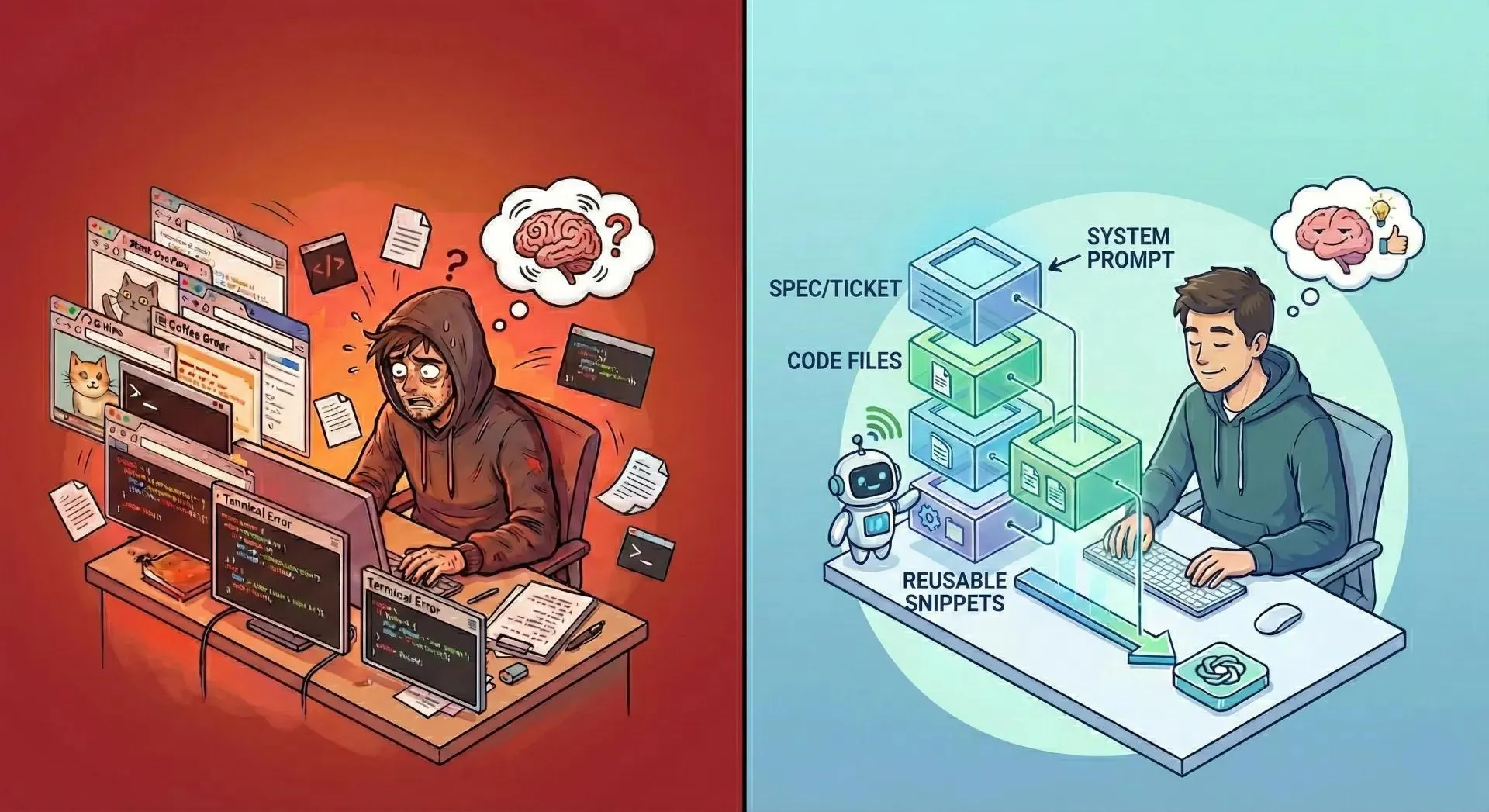
You've been there. You open Claude or ChatGPT, start pasting files, and somewhere around the third file, your internal monologue kicks in: "Is this too much? Did it read all of that? What did it actually see?"
You hit send. The response comes back confidently wrong - referencing a function that no longer exists, ignoring the spec you pasted, and missing the architectural constraint that was right there in the README.
This isn't an LLM intelligence problem. It's a context problem. And the way most developers are solving it right now, by manual copy-pasting, ad-hoc clipboard juggling, or dumping an entire repository into a single text blob, is actively making it worse.
Let's fix that.
Modern LLMs advertise generous context windows. GPT-4o offers 128K tokens. Claude 3.5 Sonnet gives you 200K. On paper, that sounds enormous.
In practice, a modest production codebase eats that budget fast.
A single mid-sized React component with TypeScript types and inline comments can run 800–1,200 tokens. Add a service layer file, a few utility modules, a Notion spec doc, and a system prompt, and you've burned 30–40K tokens before you've even described what you want the LLM to do.
The real problem isn't token count. It's signal-to-noise ratio. When you flood the context window with files that aren't directly relevant to your task, the LLM doesn't sharpen its focus; it dilutes it. Attention mechanisms aren't magic. Irrelevant code is dead weight that crowds out the context that actually matters.
Token limits aren't a bug to route around. They're a forcing function that rewards precision.

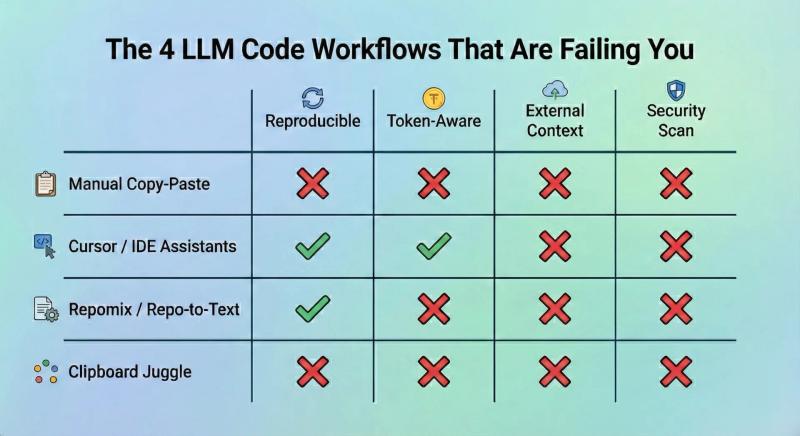
The baseline approach. Open the chat interface, open your editor, and manually copy each file. This works until it doesn't - which is usually around file three or four, when you lose track of what you've included, in what version, and in what order.
There's no token feedback. No structure. No reproducibility. Next time you run the same task, you're starting from scratch.
Cursor is genuinely excellent at what it does: in-file editing, autocomplete, and codebase-aware suggestions inside your development environment. For pure coding tasks where all the context lives in your repo, it's a strong choice.
But Cursor is blind to anything outside the IDE. It can't pull your Notion PRD, blend in a reusable system prompt from your prompt library, or check the token budget against a specific model before you paste. If your workflow involves external specs, documentation, or cross-team knowledge bases, and most real workflows do, you're back to manual steps.
Tools like Repomix solve a real problem: they flatten your entire repository into a single structured text file that you can hand to an LLM. For getting a quick, whole-repo snapshot into a chat session, they're genuinely useful.
The limitation is that they're static and blunt. You get everything, or you get nothing. There's no per-task surgical selection, no token budgeting per model, no blending in external context like Notion docs or prompt templates, and critically: no security scanning before that flattened blob leaves your machine. If your repo contains .env references, internal hostnames, or API keys, they're going in the prompt.
Some developers land on a hybrid: a mix of copy-pasting, repomix exports, and manually typed summaries, stitched together in a notes app before pasting into the LLM. It works. It's also completely unreproducible, non-collaborative, and burns 20 minutes of engineering time every single time.
The shift that changes how this works isn't a tool it's a mental model.
Stop thinking about context as "what files do I need?" Start thinking about it as "what is the minimum precise information this LLM needs to do this specific task well?"
This is the just-in-time (JIT) context model. You don't pre-load everything. You assemble surgical context at the moment you need it, scoped to the task at hand.
In practice, JIT context means:
That's it. Four layers. Assembled fresh for each task. Under budget. Reproducible.
Instead of including an entire directory, use include/exclude glob patterns to select only what matters. For a backend refactor task, that might be src/services/auth/**/*.py with an explicit exclusion of **/__pycache__/** and test files.
This alone can cut your token footprint by 60–70% compared to directory-level inclusion, without losing any relevant signal.
Different models have different context windows and different behaviors at high utilization. A prompt that performs well at 40% context fill in Claude 3.5 may degrade noticeably at 85% in GPT-4o.
Know your target model before you build the context. Check the token count against that model's limit before you paste. If you're consistently over 60–70% utilization, trim.
The order of context matters. Generally, put your system/role prompt first, your reference specs or tickets second, and your code files last. This front-loads the instruction and constraint information that helps the LLM interpret the code it sees, rather than interpreting the code first and guessing at intent.
Reusable snippets - things like "our error handling pattern," "our API response schema," or "our naming conventions doc"- belong in a managed prompt library that you can pull into any task in seconds, not buried in a Notion page you have to search for each time.
This sounds obvious. It isn't practiced consistently.
A repo-flattened context blob or a multi-file paste almost certainly contains something you don't want leaving your machine - an internal hostname, a staging API key left in a comment, a developer's email address in a config file. Public LLM APIs process your prompts. The data leaves your environment.
Build a scan step into your workflow before any "copy to clipboard" action. At minimum, grep for patterns. Ideally, use consistent token replacement - where internal-server-prod-01 becomes Server_1 across the entire context - so the LLM still understands the relationships in your code without seeing the actual secrets.
If you're doing code reviews every Monday, drafting Jira tickets from Notion every sprint, or running the same refactor pattern across multiple services - you shouldn't be rebuilding your context from scratch each time.
Define a reusable context stack: the system prompt, the relevant file pattern, the Notion database filter, the reusable snippets. Save it. Load it next time. The context should be as reproducible as your code.
Each strategy above is individually implementable with scripting, discipline, and a good notes app. Most teams don't sustain it because the friction is too high.
HiveTrail Mesh is built around this exact workflow. It's a standalone, cross-platform context assembler, not a chat client, not an IDE plugin, designed specifically to bridge the gap between your knowledge sources and the LLM prompt.
Here's how it maps to the strategies above:
The goal isn't to add another tool to your workflow. It's to replace the 15-minute pre-prompt ritual with a 90-second reproducible assembly.
(click on the image to enlarge)
The LLMs are capable. The context pipelines feeding them usually aren't.
Manual copy-paste is slow and unreproducible. Whole-repo dumps are noisy and risky. IDE plugins are powerful inside the editor and blind outside it. The gap in the middle: structured, token-optimized, security-scanned, task-specific context assembly, is where most AI coding workflows are actually failing.
JIT context isn't a complicated idea. It's just not what most tooling is built around yet.
See how HiveTrail Mesh handles it: hivetrail.com/mesh
On this page

Stop rewriting prompts. Learn when to use context engineering vs prompt engineering to optimize LLM context quality without complex RAG pipelines.
Read more about Context Engineering vs Prompt Engineering: What the Shift Means for Developers (2026)
Master the vocabulary of AI agents with this context engineering glossary. Discover 22 key terms, from context rot to attention budgets, to build better apps.
Read more about The Context Engineering Glossary: 22 Terms for AI Developers
Reduce Claude Code token usage with 9 high-leverage tactics. Learn how to prune CLAUDE.md, optimize the autocompact buffer, and cut context costs in half.
Read more about Claude Code Token Usage: Cut Context Costs in Half