 Ben •
Ben •
You have a prompt that worked last month. You paste it into a new ChatGPT session for this week's PRD. The output is flatter. Missing the non-obvious edge cases. Generic where it used to be specific.
You try again with a slightly sharper prompt. Better, but still not there. You spend 20 minutes tweaking the wording before you admit the problem isn't the prompt.
It isn't.
The prompt didn't change. What changed was the data surrounding it. Three things usually break down between the session that worked and the session that didn't - and none of them were the prompt:
Context staleness. You pasted last month's PRD as an example, but the product has moved on. The onboarding flow you were referencing got redesigned. The competitive positioning that made the earlier PRD sharp is now out of date. The model isn't hallucinating - it's anchoring correctly on what you gave it, which happens to be wrong.
Context scatter. The customer quote that made last month's PRD specific was sitting in a different Notion database, from a research synthesis you'd done three weeks earlier. This week you didn't include it because you were working fast and you forgot it existed. The model has no way to know what's missing.
Context compression. You're forty messages into a conversation, and if you're using a web interface like ChatGPT or Claude.ai, the model has been silently summarizing away the nuance you front-loaded two hours ago. Even in raw API contexts, earlier content competes for the model's attention against everything that came after. Either way, the nuance isn't recoverable in the form you put it in. The model isn't worse - your effective context got smaller without announcing it.
None of these are prompt problems. They're context problems. And unlike prompt problems, which are visible and immediate ("this output is bad, my prompt must be bad"), context problems are silent. The output degrades in ways that are hard to attribute. You end up assuming you've lost the knack for prompting, or that the model got worse, or that AI just isn't reliable for this kind of work. None of those are true.
The uncomfortable part: the PMs getting the best work out of AI aren't necessarily the ones with the cleverest prompts. They're the ones who've figured out how to deliberately assemble what the model sees before the session starts. That discipline has a name now.
Anthropic's engineering team describes context engineering as "the art and science of curating what will go into the limited context window from that constantly evolving universe of possible information." The phrase has moved fast - context engineering has become the vocabulary of 2026 for developers, and it's about to matter just as much for PMs, arguably more.
Prompt engineering asks: How do I phrase this request? Context engineering asks: What does the model need to know to succeed?
Prompt engineering has a ceiling. Once you have a good prompt, more cleverness doesn't help much. Context engineering compounds - the more deliberately you structure your product context, your templates, and your reference material, the better your output gets over time without changing your prompts at all.
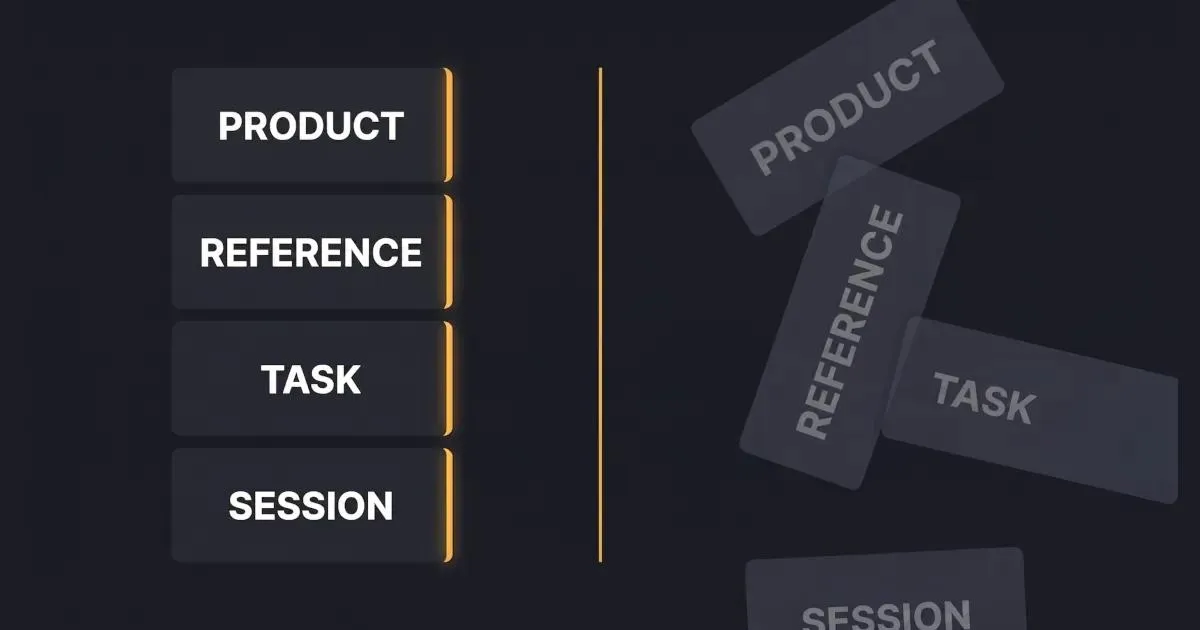
Context engineering for product managers starts with recognizing that every AI-assisted task has a context stack with four layers:
| Layer | What it contains | Stability |
|---|---|---|
| Product context | Who you are, what you build, who your users are, team conventions, DO-NOTs | Stable - changes quarterly at most |
| Reference context | PRD templates, design principles, competitor positioning, ICP descriptions | Stable - versions over time |
| Task context | The specific PRD you're writing, the interviews you're synthesizing, this sprint's tickets | Ephemeral - specific to a task |
| Session context | What you've told the model in this conversation | Volatile - compresses in long sessions |
Great PM output requires the right mix of all four layers. Most PMs are rebuilding layers 1 and 2 from scratch in every session. That's the tax - the Notion copy-paste tax that adds 30–45 minutes of setup to a task that should take five.
These aren't organizational tips. Each pattern changes the quality of your AI output directly, and the benefit grows the longer you practice them.
What it is: A single document that captures everything the model needs to correctly understand your product - written once, pasted into every session.
Most PMs re-explain their product to the AI in every new conversation. "We're building a B2B analytics tool for mid-market finance teams. Our users are FP&A analysts who..." - you know the speech, you've given it a hundred times. It's layer 1 context, and it should exist as a reusable artifact.
What a real product brief contains: One paragraph product description. Your ICP in two sentences. Core value proposition. Three to five team conventions ("we don't spec UI in PRDs," "we always include success metrics," "accessibility is a hard requirement"). A short DO-NOT list ("don't propose features that require real-time data processing - we don't support it"). Keep it in Markdown or plaintext - rich-text formatting from Notion or Google Docs tends to paste with invisible characters and formatting artifacts that degrade how the model processes it.
Test for this pattern: Paste your product brief into a fresh ChatGPT session and ask it to explain your product back to you. If the first response demonstrates correct understanding without you adding anything, your brief works. If it's off, your brief is underspecified.
Why it compounds: Six months in, this brief has been refined by every session where the model misunderstood something, every edge case you added after a bad output. A PM who joins your team inherits that brief and starts producing accurate outputs on day one. You don't.
What it is: Treating your PRD template as a versioned artifact that encodes what your team actually cares about, not just a format.
Most teams have a PRD template. Most of those templates are copy-pasted into 40 different documents, each drifting from the original as PMs customize on the fly. When you use a stale or inconsistent template as context, the model infers the wrong things about your team's conventions.
What versioning looks like: One canonical template, in one place (not copied everywhere). A short change log at the top: "v1.2 - added 'risk assumptions' section after onboarding PRD missed three edge cases." That log is itself context - it tells you, six months later, why the template looks the way it does.
Why it compounds: A template that's been updated through real use is fundamentally different from one that was designed from a playbook. The model inherits your accumulated judgment when it inherits the template. A template that's never been revised is a template that's never been tested.
What it is: Pre-defining the bundle of context the model needs for a given project - so you reload it rather than rebuild it each session.
A stack is just the specific combination of context layers a project needs. For a feature spec: product brief + relevant PRD template + the current design mock doc + three to five customer quotes specific to this feature + the roadmap row. For a stakeholder update: product brief + last quarter's OKRs + this sprint's completed tickets + the specific audience (exec brief is not the same stack as engineering sync notes).
The key distinction: Stacks are project-scoped, not session-scoped. You define them once at the start of a project, and you reload the same stack across every session until the project ships. You're not rebuilding context every Monday morning - you're opening a saved configuration.
This is the specific pattern HiveTrail Mesh was built to solve - giving you a single place to define a project stack and reload it on demand. But even if you do this manually, the pattern holds.
Why it compounds: By the time you hit week three of a sprint, your stack has been refined by every session that ran off the rails because something was missing. The stack for the next sprint starts from that refinement, not from zero.
What it is: Prioritizing accurate, current context over comprehensive context - especially when your reference material is more than a few months old.
The worst AI output usually doesn't come from missing context. It comes from stale context that's confidently wrong.
A concrete example: You're writing a PRD for a new onboarding feature. You pull in your user persona document from Q2 of last year because it's thorough. Problem: the persona was written before you pivoted to the enterprise segment. The model will produce a PRD optimized for SMB users who make fast, unilateral decisions - not enterprise buyers navigating procurement committees. The output will seem reasonable. It will be wrong in ways that aren't obvious until an engineering lead asks "wait, did we decide to support SSO or not?"
Working rule: Stale context is worse than missing context. The model can ask about what's missing - it literally cannot know that what you gave it is outdated. When in doubt, give it less and let it ask questions.
The discipline this requires: Rotating your "reference quotes" when they're more than a quarter old. Dating your persona documents. Keeping a "last verified" note on your product brief. Treating context maintenance as a standing PM task, not as overhead that you'll get to someday.
What it is: Removing or redacting sensitive customer and company data before it enters the model - deliberately, before each session, not as an afterthought.
A PM pastes a customer interview transcript into ChatGPT to synthesize themes. The transcript contains the customer's name, their company name, their email address, and revenue figures they shared in confidence. All of it just left the building.
Research from Cyberhaven found that nearly 40% of file uploads to AI tools contain PII or payment card data. PMs are a major vector for this because the work is inherently data-rich - customer interviews, support transcripts, sales call notes, revenue projections. None of this should go into an LLM verbatim.
What sanitization looks like in practice: Replace customer names with [CUSTOMER_A], [CUSTOMER_B]. Replace company names with [COMPANY_1]. Strip email addresses. Remove internal URLs and Slack links. If you're pasting a Salesforce export, remove the revenue and deal fields before you paste the account notes.
This takes five minutes manually. And the security side of this is not small - a leaked customer name in a prompt might be a minor embarrassment; a leaked revenue figure or support transcript can be a contractual violation.
If you're doing this manually, a quick find-and-replace before pasting catches most of it. If you want it automatic, Mesh's Privacy Scanner runs at export and blocks unsafe context from leaving your machine. Either way, the principle holds: sanitize before, not after.
Why it compounds: The PM who doesn't sanitize eventually has the incident. The PM who sanitizes by habit never does.
Here's what Monday morning looks like for a PM who's internalized these patterns. They're writing a PRD for a new onboarding feature.
They open their context tool - in this case, a saved stack in their Notion hub. The product brief is already there, current as of two weeks ago when they updated the competitive positioning. The PRD template, v1.4, is there. They don't paste anything yet.
They pull in the three items specific to this project: a design mock doc the design lead shared last Thursday, a research summary from user interviews they ran in February, and an engineering constraints note from a brief conversation with the tech lead. These are layer 3 - task-specific, ephemeral, assembled fresh.
They add five customer quotes - not all forty from the research, the five that are specifically about onboarding friction. Two of them mention SSO. One mentions the time cost of manual provisioning. They're dated from last month, still fresh. (This selectivity matters - Sachin Rekhi describes using Claude to find patterns across interview transcripts where the same friction surfaces repeatedly. That synthesis only works when the model gets focused, relevant excerpts - not an undifferentiated dump of everything.)
Before copying anything, they run through the sanitization pass. The customer names become [CUSTOMER_A] through [CUSTOMER_E]. One quote had a company name embedded. Gone. The engineering note had a Slack URL. Stripped.
They copy the assembled stack into Claude and start the PRD. The first output is already at the level that used to take three rounds of back-and-forth - because the model has what a senior PM would bring to the task: product context, template conventions, fresh research, and specific customer evidence.
They save the stack. Next week when they iterate, they reload, not rebuild.
Total setup time: about twelve minutes the first time this project had a stack. Two minutes each session after that. The alternative was thirty minutes of copy-paste re-setup every Monday.
If you aren't ready to adopt a dedicated context assembler yet, you can still apply these patterns manually. Here is how that looks in practice:
Notion Context Hub: Build a page called "AI Context" for each major product area. Under it: the product brief, the current PRD template, a database of tagged customer quotes (filterable by theme), and a design doc index. When you start a session, you copy the relevant sections. This works well for the stable layers (1 and 2). The friction is in assembling task-specific stacks each time - you're still doing manual selection and copy-paste for layers 3 and 4.
Claude Projects: Set up a Project for each major initiative. Add your product brief and PRD template as the system instructions. Upload current docs to the Project knowledge base. This is arguably the best no-new-tool option right now - the context is genuinely persistent across sessions, and you're not rebuilding layer 1 every time. The limitation: Projects don't update automatically when your Notion docs change, so you're managing two canonical sources of truth.
ChatGPT Custom GPTs: Build a Custom GPT with your product context baked in as instructions; upload relevant docs as knowledge. Similar to Claude Projects in structure and tradeoffs.
All of these work. They're worse than a dedicated tool in two specific ways, and I'll be direct about them:
Both of these tradeoffs are real but manageable. If you're not yet at the point where context rebuild is costing you significant time, start with one of the manual approaches. The patterns are the thing. The tooling is an accelerator.
There's a reason context engineering emerged first as a developer discipline: developers have structural advantages that PMs don't.
A developer's primary context - the codebase - is inherently organized, version-controlled, and structured. Tools like AGENTS.md and CLAUDE.md (the developer counterpart of this post is the context engineering guide for developers ) let developers define project-level context once and have it injected automatically. CI/CD systems, linters, and IDEs provide layer 1 and 2 context by default. The tooling ecosystem was built assuming the context is a codebase.
A PM's primary context is: a Notion wiki that's 60% up to date, Slack threads that are unfindable six weeks later, a Linear board that has the tickets but not the decisions behind them, Figma files where the real discussion is in comment threads, and Google Docs scattered across two workspaces. Nothing is natively organized. Nothing injects automatically.
This means PMs can't ride the wave of default tooling the way developers can. The discipline has to be intentional. Which is also why the upside is asymmetric: the PMs who figure this out get a disproportionate advantage, not just over other PMs, but in how their work reads to engineering and design stakeholders. A PRD that's clearly shallow is increasingly obvious in organizations where engineers use AI too and know exactly what it looks like when context was assembled carelessly.
The 2026 bar for PM-AI output is rising. Context engineering is how you stay ahead of it, not by being clever, but by being deliberate.
Three things you can do before you close this tab:
1. Audit where your context lives right now. Write down every source you pull from when you start an AI-assisted task - Notion pages, Slack threads, a specific Google Doc, your own memory. If there are more than five sources, you have a scatter problem. If any of them haven't been updated in three months, you have a staleness problem.
2. Write your product brief once. One page. Product description, ICP, value proposition, current priorities, team conventions, a DO-NOT list. Don't overthink the format - the discipline of having it matters more than the format. Once it exists, it's reusable across every tool you use.
3. Pick one project and build a stack for it this week. Not a complete overhaul. One project, one stack, reloaded twice. That's enough to feel the difference firsthand - the session that starts with an assembled stack versus the session that starts with a blank context window.
If you read this and thought "yes, but rebuilding these stacks manually is the thing I'm trying to avoid" - that's exactly what we built Mesh for. Notion databases, local files, and reusable prompt blocks composed into a single stack, sanitized at export, ready to reload. It's in limited beta and free during the beta period. Request early access →
The author is the founder of HiveTrail , where he's building context management tools for LLMs and agentic AI. Mesh is HiveTrail's flagship product - a desktop app that assembles just-in-time context from Notion, local files, and prompt libraries, with built-in privacy scanning and token management. Currently in limited beta.
On this page
Context engineering is the discipline of deliberately shaping what information an AI model sees before and during a task. For product managers, this means assembling the right mix of product context (who you are, who your users are), reference context (PRD templates, design principles), task context (the specific doc you're working on), and session context (what you've told the model in this conversation). It's the layer above prompt engineering, and the reason the same prompt produces different-quality output on different days.
The most common reason isn't your prompt, it's your context. Three silent failures cause shallow output: context staleness (pasting old examples the product has outgrown), context scatter (forgetting to include the customer quotes or design notes that would sharpen the output), and context compression (long sessions where the model has summarized away the nuance you front-loaded earlier). None of these are prompt problems.
Prompt engineering asks: "How do I phrase this request?"
Context engineering asks: "What does the model need to know to succeed?"
Prompt engineering has a ceiling. Once you have a good prompt, more cleverness doesn't help much.
Context engineering compounds. The more deliberately you structure your product context, templates, and reference material, the better your output gets over time without changing your prompts at all.
Separate your context into layers. Stable layers (product brief, PRD template, ICP description) should be captured once in a reusable format: a Notion hub, a Claude Project, a ChatGPT Custom GPT, or a dedicated tool. Ephemeral layers (the specific PRD you're working on, today's customer quotes) are assembled task-by-task. The setup takes 10-15 minutes the first time, and reloads take about two minutes.
Not without sanitization. Research from Cyberhaven found nearly 40% of files uploaded to AI tools contain PII or payment card data, and PMs are a major source of this because customer interviews, support transcripts, and sales call notes contain real names, emails, and company information by default. Sanitize customer data before it enters the model, either manually (redact names, replace company references with placeholders) or with a tool that does it automatically.

Read the Anthropic context engineering guide 2026 but stuck on implementation? Translate its four pillars into a concrete checklist for your next LLM session.
Read more about Anthropic Context Engineering Guide 2026: A Field Manual
A plain-English guide to Agentic Context Engineering (ACE). Learn how this evolving playbook framework prevents context collapse in self-improving AI agents.
Read more about Agentic Context Engineering (ACE) Explained: How Evolving Playbooks Fix Context Collapse
Long-running AI agents lose context over time. The fix isn't bigger context windows. It's a curated handoff between coding sessions. Here's the protocol.
Read more about Why Long-Running AI Agents Forget: A Session Context Strategy